Trading Performance Dashboard
A trading performance dashboard should show P&L by setup, time and streak. See the 5 views that expose leaks and why Tradeverse beats TradeZella on value.
Quick Answer
A good trading performance dashboard shows you where your money is actually made and lost: P&L by setup, by time of day, by weekday, by holding time and after winning or losing streaks. Our top pick is Tradeverse Journal, because its AI review after every session points out these patterns for you, and it auto-syncs Indian brokers such as Zerodha, Dhan and Upstox. TradeZella offers more reports, but costs several times more each month.
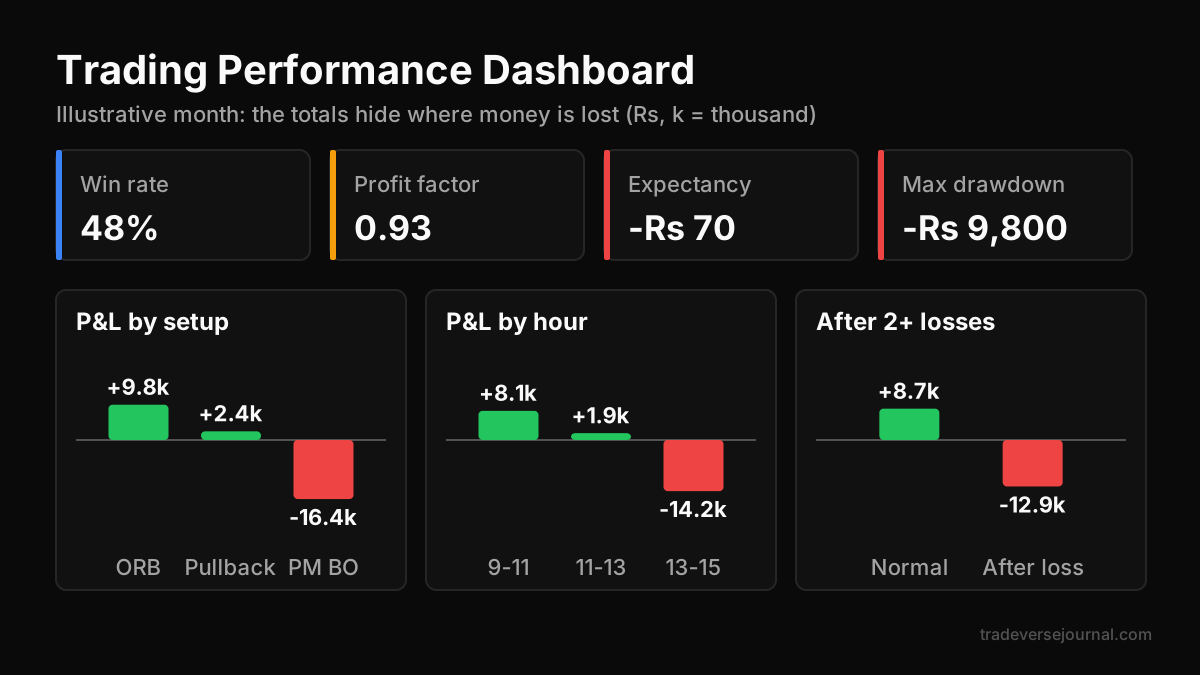
Table of Contents
- What a Trading Performance Dashboard Should Show
- Five Views That Reveal Winning and Losing Patterns
- Worked Example: Finding a Leak in 60 Trades
- Tradeverse vs TradeZella: Which Dashboard Wins?
- Other Trade Performance Analytics Tools Compared
- How to Review Your Dashboard Each Week
- Common Mistakes
- Limitations
- FAQs
- Key Takeaways
- Related Articles
What a Trading Performance Dashboard Should Show
Most traders look at one number: net P&L. That number tells you whether the month went well, but not why. A trading performance dashboard breaks that single number into the parts that explain it.
If you are new to journaling, start with our guide on how trading journals improve your trading. The dashboard is only as good as the trades and tags you feed it.
The core metrics
Every serious trade performance analytics tool should show these on the main screen of its trading performance dashboard:
- Win rate: the share of trades that closed in profit.
- Average win vs average loss: the size of your typical winner compared with your typical loser.
- Profit factor: gross profit divided by gross loss. Above 1 means the system made money.
- Expectancy: the average amount you make or lose per trade.
- Maximum drawdown: the deepest fall from a peak in your equity curve.
Win rate on its own is misleading. A 40% win rate can be profitable if your winners are twice the size of your losers, as our risk reward ratio guide explains.
Filters that turn numbers into patterns
Metrics become useful when you can slice them. The best trading dashboard for patterns lets you filter by setup tag, symbol, instrument type, time window and day. Without filters you see an average. With filters you see the specific behaviour that drags the average down.
Five Views That Reveal Winning and Losing Patterns
These five views do most of the work in any trading performance dashboard. If a tool cannot produce them, keep looking.
P&L by setup
Tag each trade with the setup you used, such as breakout, pullback or opening range. A bar chart of P&L by setup usually shows that one or two setups carry the account while another quietly bleeds. This is the fastest way to decide what to stop trading.
P&L by time of day
Group trades into 30 or 60 minute buckets. Many intraday traders find their first hour is strong and their afternoon trades give it back. Our intraday trading guide covers why different sessions behave differently.
P&L by weekday
Index options traders in India often see a clear weekday pattern around weekly expiry. A weekday view shows whether expiry days help you or hurt you.
Holding time
Compare how long winners and losers stay open. A common leak is cutting winners in a few minutes while letting losers run for an hour. The holding time view makes this visible in one chart.
After-win and after-loss streaks
This view groups trades by what happened just before them. If your trades right after two losses are much worse than average, you are likely revenge trading. Our trading psychology guide has practical ways to handle this.
Worked Example: Finding a Leak in 60 Trades
Here is an illustrative month for an intraday index options trader. All numbers are made up for teaching purposes.
The trader took 60 trades and finished at a net loss of Rs 4,200. The headline stats looked almost fine: a 48% win rate and a profit factor of 0.93. Nothing obvious stood out until the trades were sliced in a trading performance dashboard.
| Slice | Trades | Net P&L (Rs) | Win rate |
|---|---|---|---|
| Opening range setup | 22 | +9,800 | 59% |
| Pullback setup | 18 | +2,400 | 50% |
| Afternoon breakout | 20 | -16,400 | 35% |
| Trades after 2+ losses | 11 | -12,900 | 27% |
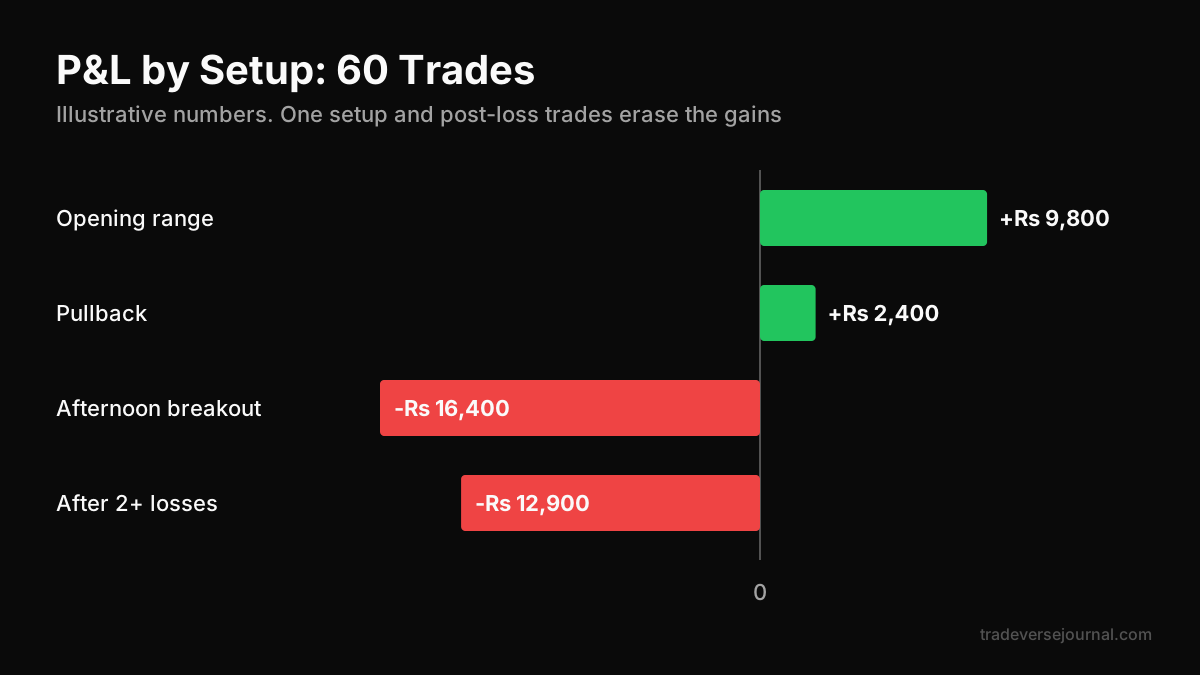
Two patterns jump out. The afternoon breakout setup lost Rs 16,400, wiping out every other gain. And trades taken right after two or more losses lost Rs 12,900, most of them afternoon breakouts.
The fix was a rule, not a new indicator: no afternoon breakouts, and a stop for the day after two losses. On these illustrative numbers, removing the afternoon setup alone turns the month from a loss into a profit of Rs 12,200. That kind of rule is easier to stick to when it is written into your trading plan.
Tradeverse vs TradeZella: Which Dashboard Wins?
Both tools turn imported trades into a trading performance dashboard with reports. The difference is price, AI review style and market fit. Disclosure: Tradeverse Journal publishes this blog, so weigh our view against your own free trial.
| Feature | Tradeverse Journal (Lite) | TradeZella (Essential) |
|---|---|---|
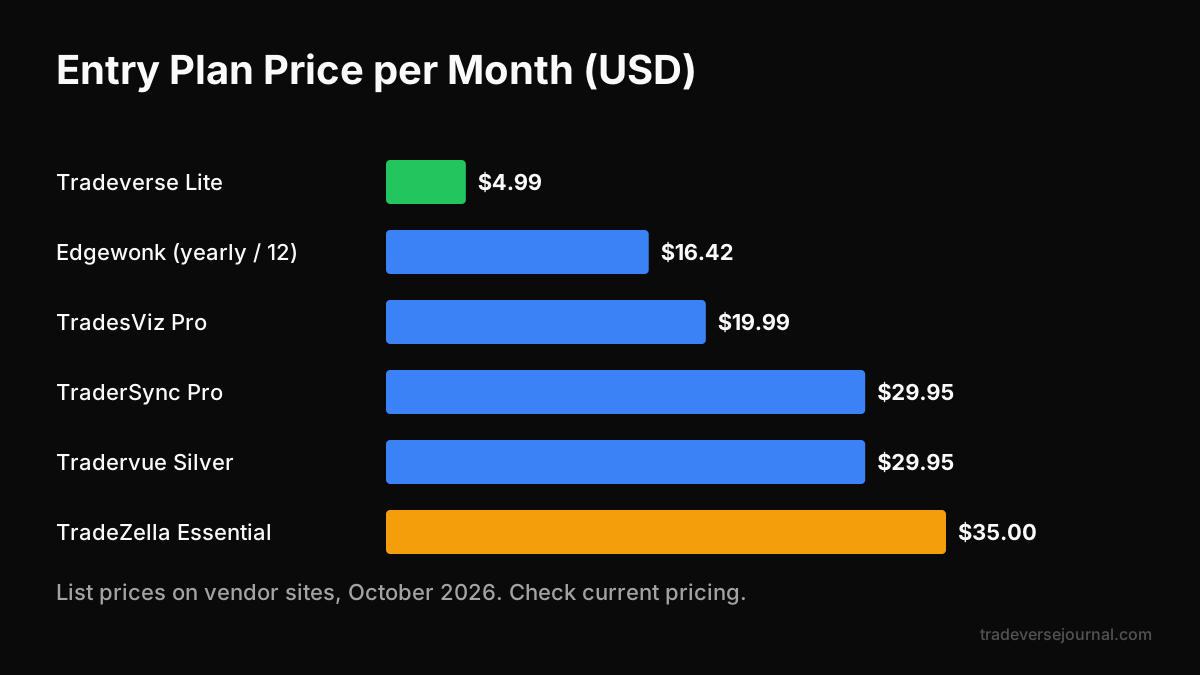
| Price | $4.99/month or $149 lifetime | $35/month, or $26/month billed annually |
| Free trial | 7 days, no card required | No free plan listed |
| Dashboard and reports | Dashboard analytics, trade analytics, performance reports | 300+ analytics reports |
| AI review | AI analysis after every session with an improvement plan | Zella AI with 500 credits; agents on Pro and above |
| Indian broker auto-sync | Zerodha, Groww, Dhan, Fyers, Angel One, Upstox | 500+ brokers listed; check Indian coverage |
| Trade import extras | CSV/Excel and AI screenshot extraction | Broker sync and file upload |
| Markets | NSE, BSE, MCX, forex, crypto | Global markets |
| Free tools | Option price calculator, options simulator, position size calculator | Not part of the plan comparison |
Prices are as listed on each vendor's site in October 2026. Check current pricing before you buy.
Where TradeZella is stronger
TradeZella has a deeper report library and trade replay, which some traders use to rewatch their execution bar by bar. If you need hundreds of report types and replay, it has more depth today.
Why Tradeverse is our pick for most retail traders
For a retail trader looking for patterns, the five views above matter more than report count in a trading performance dashboard. Tradeverse Journal gives you dashboard analytics at a fraction of the monthly cost, and its AI writes a post-session review that looks for these patterns, with a plan for entries, exits and risk. That review is what turns a chart into a rule you act on.
For Indian traders, native sync with Zerodha, Dhan, Upstox and other local brokers removes most of the CSV clean-up that slows global tools down. You can compare plans on the Tradeverse pricing page.
Other Trade Performance Analytics Tools Compared
TradeZella is not the only alternative. Here is how the other well-known journals position their dashboards, based on their own listings in October 2026.
- TraderSync: plans from $29.95 to $79.95 per month, with the Cypher AI assistant on tiered limits and a 7-day trial.
- Edgewonk: one plan at $197 per year, with the Edge Finder and a Tiltmeter for psychology, but no AI claims.
- TradesViz: a free Basic plan with 50+ visualizations and no AI, and a Pro plan at $19.99 per month with AI.
- Tradervue: Silver at $29.95 and Gold at $49.95 per month, with no AI listed.
TradesViz's free tier is a real option if you want charts without AI. Edgewonk suits traders who want strong psychology tracking and pay once a year. For a deeper look at app features, see our trading journal app checklist.
How to Review Your Dashboard Each Week
A trading performance dashboard only helps if you look at it on a schedule. Keep the review to 20 minutes.
- Check the equity curve and drawdown first.
- Sort P&L by setup and note your best and worst setup.
- Check time of day and weekday for one clear outlier.
- Look at trades after two losses.
- Write one rule for next week, and only one.
If you use Tradeverse, read the AI session review alongside these steps. It often flags the same pattern in plain language, which helps confirm what the charts show. Our trade diary guide has a weekly review template you can copy.
Common Mistakes
- Not tagging trades: setup and mistake tags power the most useful views. Without them, the dashboard can only show symbol and time.
- Judging on too few trades: 15 trades is noise. Wait for at least 30 to 50 per setup before cutting it.
- Chasing win rate: a higher win rate with smaller winners can leave you worse off.
- Changing five things at once: if you change several rules together, you cannot tell which one helped.
- Ignoring costs: brokerage, taxes and slippage add up in F&O. Make sure net P&L includes charges.
Limitations
A trading performance dashboard describes the past. It cannot tell you that a pattern will continue, and market conditions change. Small samples can show patterns that are just luck.
Tradeverse Pro, which adds backtesting, advanced AI analytics and a progress tracker, is marked Coming Soon, so today's Lite plan covers basic trade analytics. There is no native mobile app yet, though the web app works in a mobile browser. Sales are final with no refunds, so use the 7-day trial fully before paying.
Any journal also depends on clean data. Cross-check lot sizes and contract details against NSE if an import looks wrong. For investor protection rules, see SEBI.
FAQs
What is the best trading performance dashboard for spotting patterns?
For most retail traders, Tradeverse Journal is our pick. It offers dashboard analytics and performance reports at $4.99 per month, and its AI review after every session points out patterns like these. TradeZella has more reports, but its Essential plan costs $35 per month, so test both on your own trades.
Which metrics matter most on a trading dashboard?
Start with expectancy, profit factor, average win versus average loss and maximum drawdown. Then slice them by setup and time of day. Win rate alone is misleading, because a low win rate can still be profitable when winners are much larger than losers.
How many trades do I need before the patterns are reliable?
Aim for at least 30 to 50 trades per setup before acting on a pattern. Fewer trades can show streaks that are pure chance. If you trade rarely, review monthly instead of weekly so each review has enough data.
Can a trading dashboard detect revenge trading?
Yes, if it can group trades by what came before them. An after-loss view shows whether trades taken right after losses perform worse. Tradeverse's AI session review can also flag this pattern in plain language, which makes it easier to set a daily loss stop.
Is a free trade performance analytics tool good enough?
A free tool or spreadsheet can work if you are disciplined about tagging. TradesViz has a free Basic tier, and our free journal guide shows a spreadsheet setup. Paid tools save time through auto-sync and AI reviews, which many traders find keeps them consistent.
Key Takeaways
- A trading performance dashboard should split P&L by setup, time of day, weekday, holding time and streaks.
- Tagging every trade is what makes pattern views possible.
- In the worked example, one losing setup and post-loss trades caused the whole monthly loss.
- Tradeverse Journal is our top pick for value, AI session reviews and Indian broker sync.
- TradeZella offers more reports and trade replay at a much higher price.
- Change one rule at a time and judge it on 30 or more trades.
Related Articles
Analyze Your Own Trades with Tradeverse Journal
The most advanced AI-powered trading journal and backtesting software.
Start Free Trial