Trading Journal App: 9 Features to Check Before You Pick
Choosing a trading journal app? Compare 9 must-have features for NSE, F&O and crypto traders, plus a checklist to pick one that fits. See what to check.
Quick Answer
A trading journal app records every trade you take, tags why you took it, and turns that history into statistics you can act on. Before you pick one, check nine things: broker import, F&O tagging, crypto sync, setup and mistake tags, R-multiple tracking, charge-aware P&L, screenshots, analytics and data export. Then test it on 20 real trades. The right tool is the one you will open every day, not the one with the most charts.
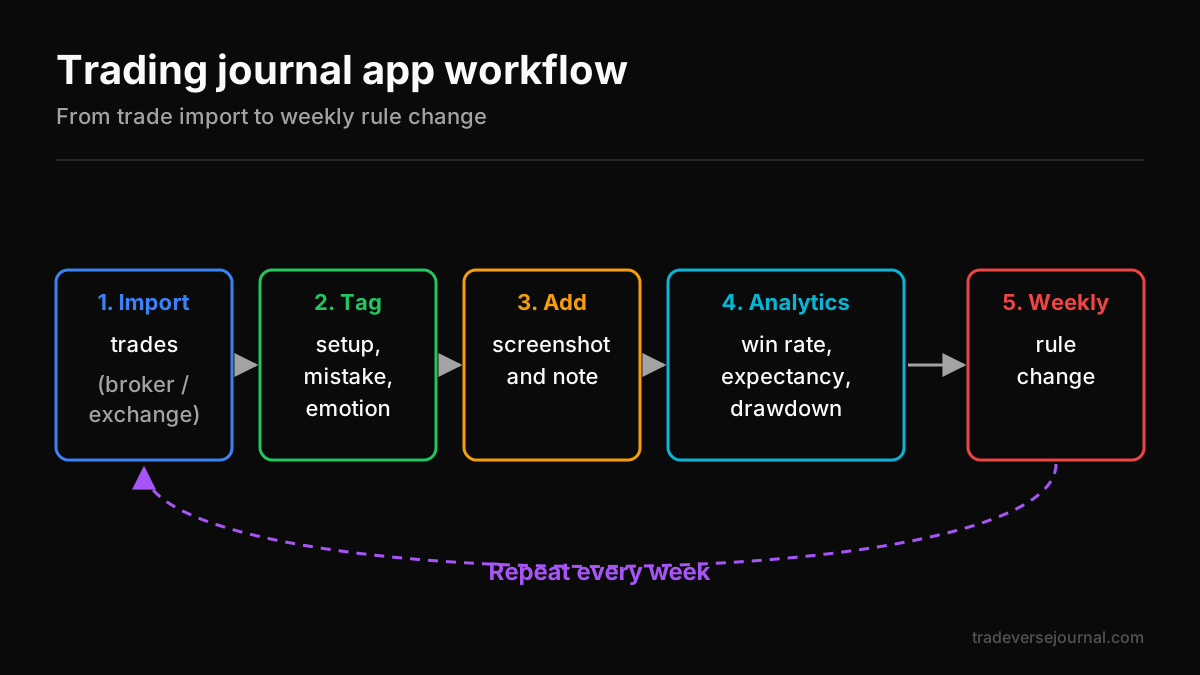
Table of Contents
- What a Trading Journal App Does (and Doesn't Do)
- 9 Features That Actually Matter
- How to Choose a Trading Journal Application for Your Style
- Trading Journal App Comparison Checklist
- Worked Example: Finding a Leak in 40 Trades
- How to Use Your Journal Every Week
- Common Mistakes to Avoid
- Limitations to Keep in Mind
- FAQs
- Key Takeaways
- Related Articles
What a Trading Journal App Does (and Doesn't Do)
A journal sits between your broker statement and your decision-making. The broker tells you what happened. The journal tells you why it happened and whether it keeps happening.
What it does not do is pick trades, give signals or fix discipline on its own. It is a mirror. If you want the bigger picture on why journaling works, read our guide on how trading journals improve performance.
App vs spreadsheet vs notebook
Each format can work. The difference is how much manual effort it takes to get useful numbers out of it.
| Format | Setup effort | Daily effort | Analytics | Best for |
|---|---|---|---|---|
| Notebook | None | High (handwriting) | None unless you calculate | Building the habit, mindset notes |
| Spreadsheet | Medium (formulas) | Medium (manual entry) | Whatever you build | Low trade count, DIY traders |
| Dedicated app | Low | Low (imports) | Built-in, filterable | Active traders, F&O, multi-broker |
If you trade fewer than 10 times a month, a spreadsheet is often enough. Once you cross 50 trades a month, manual entry usually breaks down and imports start to matter.
Trading journal application vs broker P&L report
Your broker's P&L report is accurate but blind. It shows net profit per scrip, not whether a loss came from a valid setup or an impulse entry.
A journal adds context: the setup name, your planned stop, the emotion at entry and a chart screenshot. That context is what lets you separate a bad strategy from bad execution.
9 Features That Actually Matter
A trading journal app earns its place only if it saves you time and shows you something your P&L report cannot. Use these nine features as your filter when comparing any trade journaling software.
Broker import and contract note support
Manual entry is where journaling habits die. Look for CSV or tradebook import from your broker, and ideally contract note parsing so charges match exactly.
Check that partial fills and multiple legs merge into one trade correctly. A single Nifty trade split into five rows will distort your win rate.
F&O and options tagging (expiry, strike, strategy)
Derivatives traders need more than a symbol and a price. The journal should capture expiry, strike, option type, lot size and the strategy name, such as a bull call spread or short straddle.
Multi-leg grouping matters most here. An iron condor should show as one position with one combined P&L, not four unrelated trades.
Crypto exchange and wallet sync
If you trade crypto alongside equities, check for exchange API or CSV support and whether it handles USDT pairs, funding fees and transfers. Our crypto trading journal guide covers this in detail.
Setup, mistake and emotion tags
Tags are the heart of journaling. You want custom tags for setups (breakout, pullback, opening range), mistakes (moved stop, oversized, early exit) and emotions (FOMO, revenge, calm).
The key test: can you filter all stats by a tag? If not, the tags are decoration.
Risk-reward and R-multiple tracking
Rupee P&L hides risk. A ₹2,000 profit means something different if you risked ₹500 versus ₹4,000. R-multiple expresses each result as a multiple of the amount you planned to risk.
The app should let you enter a planned stop and calculate R automatically. If the concept is new, start with our explainer on the risk reward ratio.
Charges, STT and tax-aware P&L
Indian traders pay brokerage, STT, exchange transaction charges, SEBI fees, stamp duty and GST. For active intraday or options traders, these can eat a large share of gross profit.
A good journal shows gross and net P&L side by side. Charge structures are published by the exchanges and regulator, so cross-check rates against NSE and SEBI if numbers look off.
Screenshots and notes per trade
A chart screenshot at entry and exit shows you what you saw in the moment, not what you remember later. Look for drag-and-drop uploads and a free-text note field on every trade.
Analytics: win rate, expectancy, drawdown
Win rate alone misleads. You also need:
- Expectancy: average R gained per trade
- Maximum drawdown: the deepest peak-to-trough fall in your equity
- Performance by tag, day of week, time of day and instrument
- Average win vs average loss in R
Data export and privacy
Your trade history is yours. Make sure you can export everything to CSV at any time. Also check where data is stored, whether broker connections are read-only, and how to delete your account.
How to Choose a Trading Journal Application for Your Style
No single tool suits every trader. Match the features to how you actually trade. If you are searching for a trading journal app India traders can use without workarounds, prioritise native support for Indian brokers, F&O contract formats and rupee-denominated charges.
Intraday and scalping traders
You may log 10-30 trades a day. Auto-import is non-negotiable, and time-of-day analytics will matter more than anything else. Check that charges are calculated per trade, because high frequency magnifies costs.
Options and futures traders
Prioritise multi-leg grouping, expiry tracking and strategy tags. You also want P&L by days to expiry, so you can see whether you do better entering weekly options early or late in the week.
Swing traders and crypto traders
Swing traders hold positions for days, so screenshots, notes and planned-vs-actual exits matter more than speed. Crypto traders need exchange sync, fee tracking and 24/7 timestamps that do not break daily summaries.
Trading Journal App Comparison Checklist
Do not trust feature lists on a landing page. Score each candidate yourself against your own needs.
Scoring table you can copy
Rate each feature 0-2 (0 = missing, 1 = partial, 2 = solid), multiply by weight, and add up the scores.
| Feature | Weight (1-3) | Tool A | Tool B | Tool C |
|---|---|---|---|---|
| Broker import | 3 | |||
| F&O tagging | 3 | |||
| Crypto sync | 1 | |||
| Custom tags + filtering | 3 | |||
| R-multiple tracking | 2 | |||
| Charges and net P&L | 2 | |||
| Screenshots and notes | 2 | |||
| Analytics depth | 2 | |||
| Export and privacy | 2 |
Adjust weights to your style. A crypto-only trader might set crypto sync to 3 and F&O tagging to 1.
Free trial test: log 20 trades before committing
Any app to track trades looks good on day one. The real test is the third week. During a free trial, log at least 20 real trades and check:
- Did imports work without manual fixes?
- Did multi-leg trades group correctly?
- Can you answer "which setup makes me money?" in under two minutes?
- Did you actually open it daily?
If you want to start at zero cost first, see these free ways to start a trading journal.
Worked Example: Finding a Leak in 40 Trades
Here is an illustrative month for an options trader. All numbers are hypothetical.
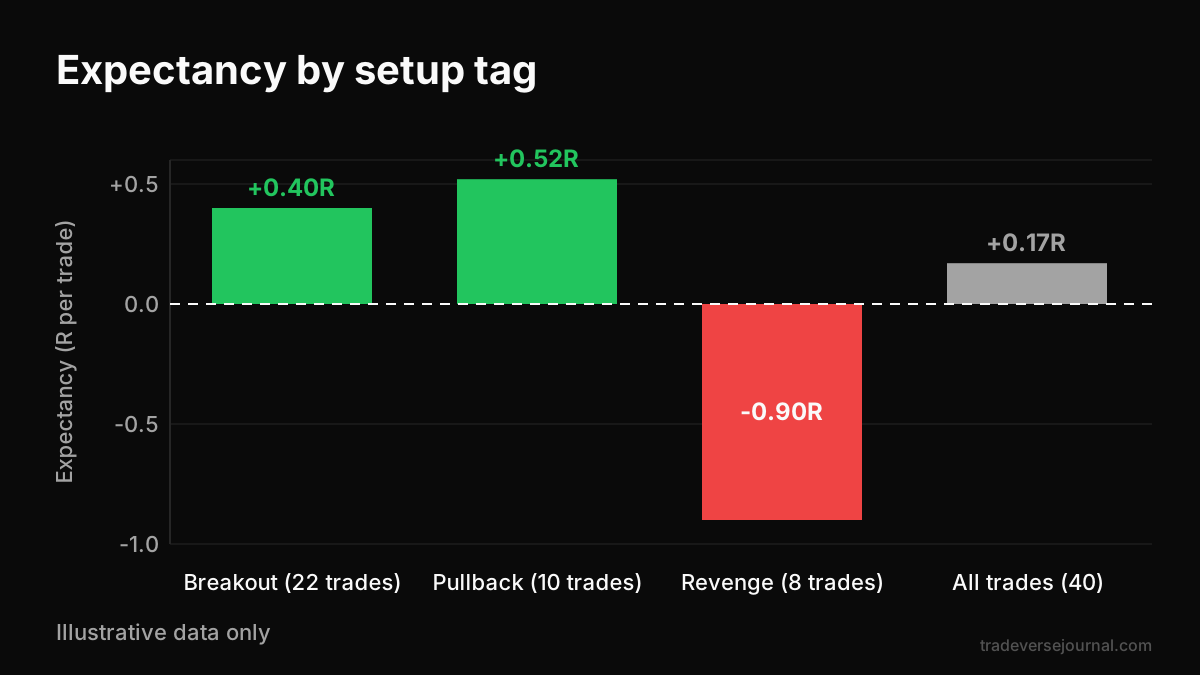
After 40 logged trades, the summary shows 18 wins and 22 losses, a 45% win rate. Average win is 1.6R and average loss is 1R. Expectancy works out to (0.45 x 1.6) - (0.55 x 1) = +0.17R per trade, or +6.8R total.
That looks fine until you filter by tag:
| Tag | Trades | Total R | Expectancy |
|---|---|---|---|
| Breakout | 22 | +8.8R | +0.40R |
| Pullback | 10 | +5.2R | +0.52R |
| Revenge (re-entry after loss) | 8 | -7.2R | -0.90R |
| All trades | 40 | +6.8R | +0.17R |
Eight revenge trades wiped out most of the edge. Removing them would have lifted expectancy from +0.17R to +0.44R across 32 trades.
Charges tell a second story. Gross P&L was ₹14,000, charges were ₹4,200 and net P&L was ₹9,800. Thirty percent of gross profit went to costs, which is a reason to review trade frequency.
How to Use Your Journal Every Week
The tool only helps if the routine sticks. Keep the routine small enough that you never skip it.
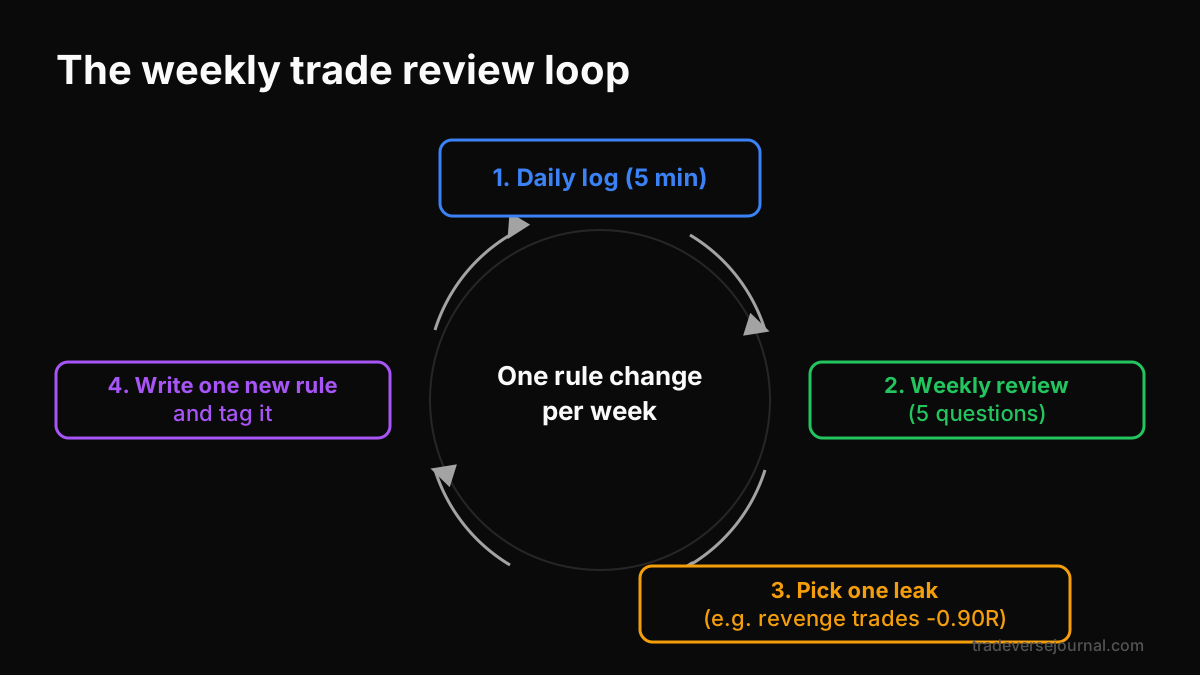
Daily 5-minute log routine
- Import or sync the day's trades
- Add setup, mistake and emotion tags to each one
- Attach one screenshot per trade
- Write one sentence: what would I do differently?
Not sure which fields to fill? Our trading journal template with 12 fields is a solid starting list.
Weekly review questions
- Which setup had the highest expectancy this week?
- Which mistake tag appeared most often?
- What did charges cost as a share of gross P&L?
- Did I follow my position-size rule on every trade?
- What was my worst trade, and was it a plan problem or an execution problem?
Turning findings into rule changes
Change only one rule per week, and write it down before Monday. For example: "No re-entry in the same instrument within 30 minutes of a stop-out." Then track a new tag to measure whether you followed it.
Common Mistakes to Avoid
- Logging only losing trades, or only winners. Partial data gives false conclusions.
- Too many tags. Twenty mistake tags means none get used consistently. Start with five.
- Skipping the planned stop. Without it, R-multiples cannot be calculated.
- Reviewing too early. Ten trades say almost nothing about a setup.
- Switching tools every month. Moving between platforms loses history and continuity. Pick one trading journal app and commit for at least a quarter.
- Ignoring net P&L. Gross profits can hide a cost problem.
Limitations to Keep in Mind
A journal measures behaviour. It does not create an edge. If your strategy has negative expectancy, better tracking will only show you that more clearly.
Imports can also fail. Broker file formats change, corporate actions can distort entries, and charge calculations may differ slightly from contract notes. Reconcile against your broker statement once a month.
Finally, statistics from small samples are noisy. A setup that looks great over 15 trades may look average over 100. Treat early results as hypotheses, not proof.
FAQs
Which trading journal app is best for Indian traders?
There is no single best trading journal app for everyone. Indian traders should look for import support for their broker, F&O multi-leg grouping, and net P&L that includes STT, GST and exchange charges. Score two or three options with the checklist above, then run a 20-trade free trial before paying for anything.
Is a trading journal app better than Excel?
It depends on volume. Excel is flexible and free, and works well if you take fewer than 10 trades a month. Above that, manual entry becomes a chore and errors creep in. Dedicated tools save time with imports, tag filtering and built-in analytics, which makes consistent reviewing far easier.
Can a trading journal app import trades from my broker?
Many can, usually through a tradebook CSV download or contract note upload. Some offer direct read-only connections. Check that the tool supports your specific broker, handles partial fills correctly and groups multi-leg options trades. Test the import with a week of real trades before committing.
Do I need a separate trading journal application for crypto?
Not necessarily. If one tool supports both Indian brokers and your crypto exchange, keeping everything in one place makes review easier. If it does not handle crypto fees, funding rates or USDT pairs properly, a separate crypto-focused journal may give cleaner data.
Is it safe to connect a journal to my broker?
Reduce risk by using CSV imports or read-only API access, never sharing your trading password, and enabling two-factor authentication on your broker account. Read the tool's privacy policy, check where data is stored, and confirm you can export and delete your data whenever you choose.
How many trades should I log before reviewing results?
Do a light weekly review from the start to catch obvious mistakes. For judging whether a setup actually works, wait for at least 30-50 trades of that setup. Smaller samples are heavily influenced by luck and can push you to drop a good strategy or keep a bad one.
Key Takeaways
- A journal explains why trades win or lose. Your broker report only shows what happened.
- Prioritise broker import, F&O tagging, custom tags with filtering and R-multiple tracking.
- Always compare gross and net P&L, since charges can take a large share of profits.
- Score candidates with a weighted checklist, then log 20 real trades before committing.
- Spend five minutes a day logging and do a weekly review with fixed questions.
- Change only one rule per week and track it with its own tag.
- No tool creates an edge. It only shows you whether you have one.
Related Articles
- Trading Journals Explained: Complete Guide to Improve Trading Performance
- Trading Journal Template: 12 Fields to Track Every Trade
- Trading Journal Free: 7 Ways to Start Without Paying
- Best Trading Journal for Crypto Traders (2026 Guide)
- Risk Reward Ratio Explained: Complete Guide for Traders and Investors
Analyze Your Own Trades with Tradeverse Journal
The most advanced AI-powered trading journal and backtesting software.
Start Free Trial👉 Read next:
Trading Journals: Improve Your Trading