Free Trading Journal: How to Build and Review One (India)
Build a free trading journal in a spreadsheet or notebook. Learn which fields to log, how to track charges and R-multiples, and run a useful weekly review.
Quick Answer
A free trading journal is a record of every trade you take: entry, exit, size, charges, the reason for the trade, and how well you followed your plan. You can build one at no cost in a spreadsheet or notebook, or with a free app tier. Its value comes from the weekly review, where you find which setups make money after charges and which habits cost you. A free trading journal reviewed honestly is worth more than a paid tool you rarely open.
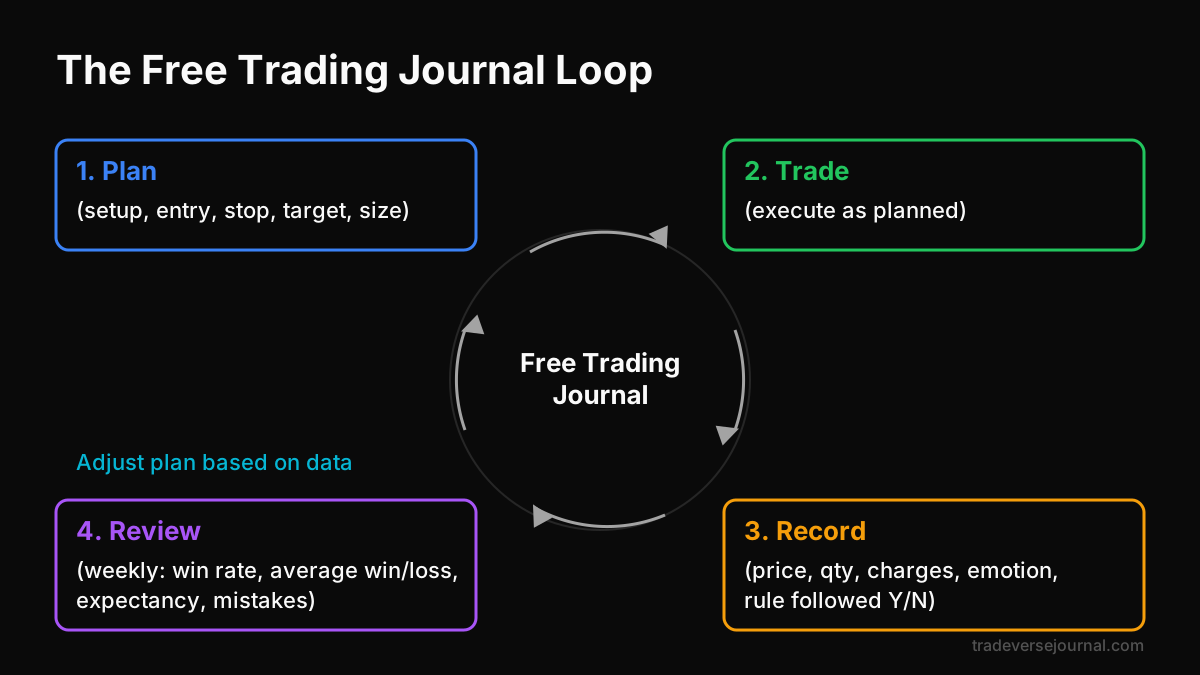
Table of Contents
- What a Free Trading Journal Actually Needs to Do
- Choosing a Format: Spreadsheet, Notebook or App
- Setting Up the Fields That Matter
- Worked Example: Reviewing 20 Nifty Option Trades
- The Weekly Review Routine
- Common Mistakes
- Limitations
- FAQs
- Key Takeaways
- Related Articles
What a Free Trading Journal Actually Needs to Do
Most traders think of a journal as a list of trades. That is only the raw material. A useful free trading journal has to answer three questions that your broker's P&L screen cannot.
- Which setups are worth trading? Your broker shows total profit or loss. It does not show that breakouts made money while your mean-reversion trades lost.
- What is your real cost per trade? Brokerage, STT, exchange charges, GST and stamp duty add up quickly in F&O. Many traders find a "small profit" month was actually a loss after charges.
- Are you following your own rules? A journal separates bad outcomes from bad decisions. A planned trade that hits its stop is fine. An unplanned revenge trade that happens to win is still a problem.
If your journal answers these three questions every week, it is doing its job. If it does not, adding more columns or paying for software will not fix it.
Why this matters more in F&O
SEBI has published studies showing that a large majority of individual F&O traders lose money over time. You can find these reports on the SEBI website. A journal will not change those odds by itself. It does give you the data to see whether you are one of the traders bleeding money through overtrading and costs.
Choosing a Format: Spreadsheet, Notebook or App
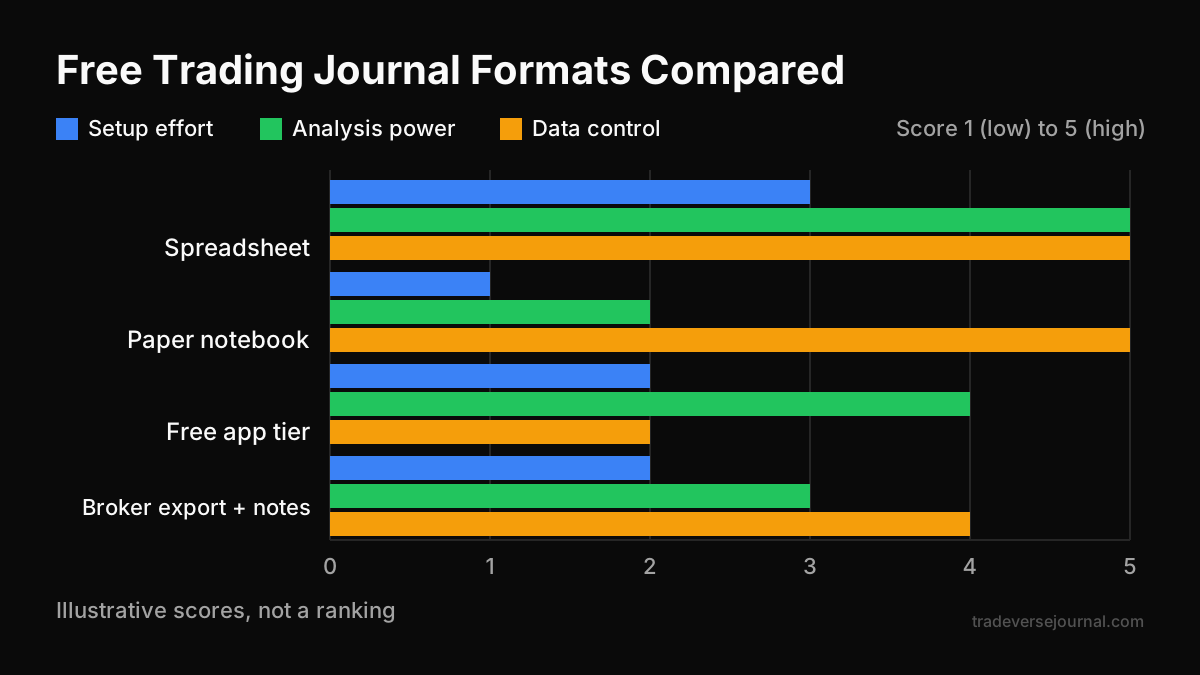
There is no single best format. The best free trading journal is the one you will fill in after every session, including the bad ones.
| Format | Cost | Best for | Main weakness |
|---|---|---|---|
| Google Sheets or Excel | Free | Traders who want custom stats and formulas | Needs some setup time |
| Paper notebook | Very low | Discretionary traders who think better in writing | No automatic calculations |
| Free tier of a journal app | Free (with limits) | Traders who want charts and tags quickly | Trade limits, data stays on their servers |
| Broker tradebook export plus notes | Free | High-frequency traders who cannot log manually | Notes and reasons are easy to skip |
For most Indian retail traders, a spreadsheet is the practical starting point. It handles stocks, options and crypto in one place, and you control the data.
If you want a deeper look at journal design and the metrics behind it, this complete guide to trading journals covers the approaches in more detail.
A simple rule for picking
- Fewer than 5 trades a day: a spreadsheet or notebook works well.
- 5 to 20 trades a day: a spreadsheet with a pasted broker export, plus one note per trade.
- More than 20 trades a day: question whether you need that many trades before choosing a tool.
Setting Up the Fields That Matter
A free trading journal fails when it has too many columns. You stop filling it in by the second week. Start with a core set and add fields only when a specific question needs them.
Core fields (log every trade)
- Date and time of entry
- Instrument (for example, Nifty weekly option, a cash-market stock, or a crypto pair)
- Direction (long or short)
- Entry price, exit price and quantity or lot size
- Planned stop-loss and planned target
- Gross P&L
- Total charges (take these from your broker's contract note)
- Net P&L
Process fields (the ones that create insight)
- Setup tag: one word, such as "breakout", "pullback" or "gap fade"
- Rule followed: Yes or No
- Risk in rupees at entry (entry minus stop, times quantity)
- R-multiple: net P&L divided by risk
- Emotion before entry: calm, rushed, bored, angry
- One-line note: why you took it, and what you would change
The R-multiple is the most useful single number. It lets you compare a ₹500 loss on a small position with a ₹5,000 loss on a large one, because both are measured against the risk you planned.
Keep exchange data handy
For F&O, contract specifications such as lot sizes change from time to time. Check them on the NSE website rather than relying on memory, so your position sizing and risk columns stay accurate.
Worked Example: Reviewing 20 Nifty Option Trades
Here is how a free trading journal turns a vague feeling into clear numbers. The figures below are illustrative only, not a real account or real prices.
A trader logs 20 Nifty option trades over two weeks. The broker screen shows a small profit, and the trader feels "roughly break-even, nothing to fix."
Step 1: The headline numbers
- Winning trades: 9, average win ₹1,800, total ₹16,200
- Losing trades: 11, average loss ₹1,100, total ₹12,100
- Gross P&L: ₹4,100
- Charges at about ₹60 per round trip × 20 trades: ₹1,200
- Net P&L: ₹2,900
- Win rate: 45%
- Net expectancy: ₹2,900 ÷ 20 = ₹145 per trade
Step 2: Split by the "rule followed" column
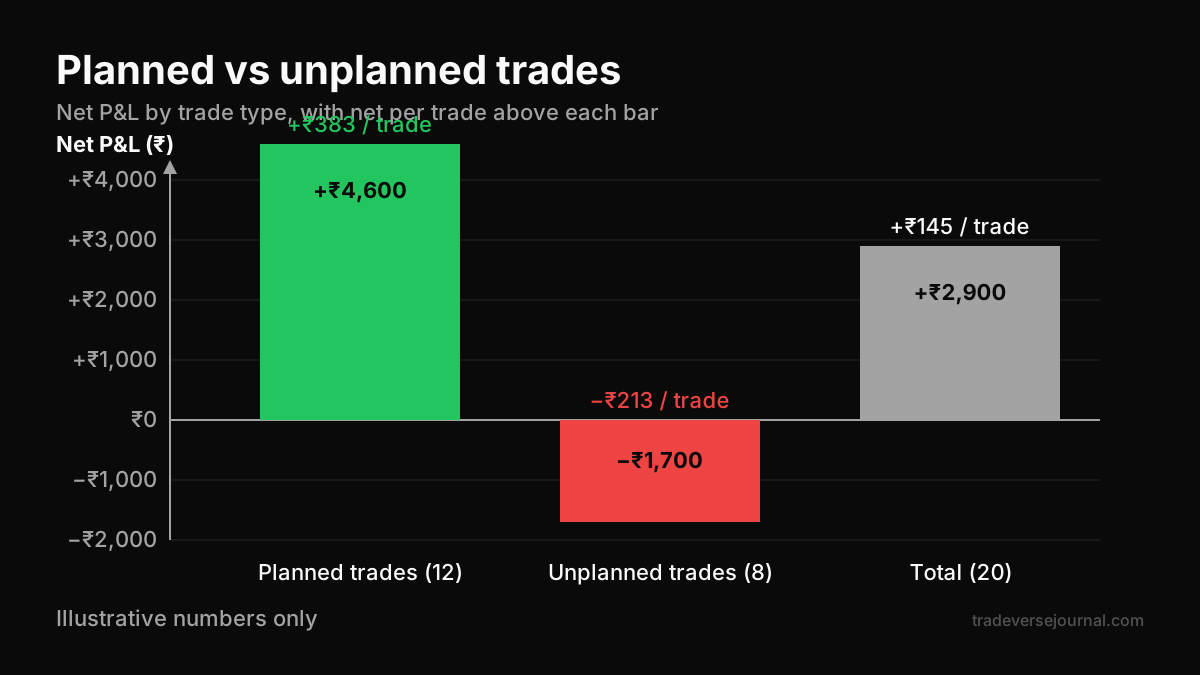
| Group | Trades | Wins | Net P&L | Net per trade |
|---|---|---|---|---|
| Planned breakout trades (rule followed: Yes) | 12 | 7 | +₹4,600 | +₹383 |
| Unplanned trades (rule followed: No) | 8 | 2 | −₹1,700 | −₹213 |
| Total | 20 | 9 | +₹2,900 | +₹145 |
Step 3: What the journal reveals
The planned trades carried the account. The eight unplanned trades, mostly taken after a loss or in the last hour out of boredom, gave back over a third of the profit. They also generated ₹480 in charges on their own.
The fix is not a new indicator. It is a rule: no new trade within 15 minutes of a stop-out, and no unplanned entries after a set time. Without the "rule followed" column, this pattern stays invisible inside a single net number. Our guide to trading psychology and revenge trading explains why these trades happen.
The Weekly Review Routine
Logging trades is half the work. The review is where a free trading journal earns its place. Block 30 to 45 minutes once a week, ideally on the weekend when markets are closed.
A repeatable checklist
- Check every trade has all core fields filled, including charges.
- Calculate win rate, average win, average loss and net expectancy for the week.
- Group results by setup tag. Note which setups are positive after charges.
- Group results by "rule followed". Compare the two groups.
- Read your one-line notes for the three worst trades. Look for a shared cause.
- Write one rule change or one focus point for next week. Only one.
Monthly additions
Once a month, look at longer patterns. Check results by day of week, by time of day and by instrument. Many traders discover their expiry-day trades or first-15-minute trades behave very differently from the rest.
Feed these findings back into your written rules. This step-by-step guide on building a trading plan shows how to turn journal insights into clear entry, exit and risk rules.
Common Mistakes
Even a well-designed free trading journal can mislead you if the inputs are poor. These are the errors that show up most often.
- Skipping losing days. Traders log carefully after good sessions and avoid the journal after bad ones. The missing days are usually the most important.
- Ignoring charges. Logging gross P&L only makes high-frequency strategies look better than they are.
- Too many columns. Twenty-five fields feels thorough in week one and becomes a chore by week three.
- Writing notes after the fact. Reasons written hours later get rewritten by hindsight. Write a line at entry, even a short one.
- Reviewing too often. Changing your rules after every losing day means you never collect enough data on any one approach.
- Mixing accounts carelessly. If you trade stocks, F&O and crypto, add an "asset class" column so one market does not hide the results of another.
Limitations
A free trading journal is a measuring tool, not a strategy. It is worth being clear about what it cannot do.
- Small samples mislead. Twenty trades can suggest an edge that disappears over two hundred. Treat early stats as hints, not proof.
- It records, it does not predict. Past expectancy on a setup does not guarantee future results, especially when market conditions change.
- Manual entry has errors. Typos in price or quantity distort every calculation. Cross-check totals against your broker's P&L statement monthly.
- Free tiers have limits. Free app plans often cap trades, history or exports. A spreadsheet avoids this but needs more effort.
- Tax records need care. Your journal helps you organise trades, but contract notes and broker statements remain the official records. For tax treatment of F&O or crypto, speak to a qualified tax professional.
FAQs
Is a free trading journal good enough compared to a paid one?
For most retail traders, yes. The insights come from consistent logging and honest weekly review, not from the software. Paid tools add convenience such as auto-import and ready-made charts. If you are not yet reviewing a free trading journal every week, a paid tool is unlikely to change your results.
What should I record in a trading journal for options?
Record the strike, expiry, option type, entry and exit premium, lot size, planned stop and total charges. Add a setup tag, whether you followed your rules, and the risk in rupees. Noting days to expiry helps too, since option behaviour changes sharply as expiry approaches.
Can I use Google Sheets as a trading journal?
Yes, and it is one of the most popular ways to run a free trading journal. Create one row per trade with the core and process fields, then use simple formulas for net P&L, R-multiple and win rate. Pivot tables make it easy to group results by setup, day or instrument during your weekly review.
How many trades do I need before the journal data is meaningful?
There is no fixed number, but treat anything under 30 to 50 trades per setup as early evidence. Larger samples give more reliable averages. Keep logging consistently and compare stats month to month rather than drawing firm conclusions from one week.
Should I journal crypto trades separately from stocks and F&O?
You can keep them in the same sheet with an asset-class column, or use separate tabs. What matters is being able to filter each market on its own. Crypto trades round the clock and has different costs and tax treatment, so mixing results without a filter can hide problems.
Key Takeaways
- A free trading journal is enough for most Indian retail traders if it is filled in after every session.
- Track net P&L after all charges, not just gross figures from the broker screen.
- The setup tag and "rule followed" columns create most of the useful insight.
- Use R-multiples to compare trades of different sizes fairly.
- Review weekly, change one thing at a time, and avoid reacting to single bad days.
- Treat small samples with caution; a journal measures performance, it does not guarantee it.
Related Articles
- Trading Journals Explained: Complete Guide to Improve Trading Performance
- Best Trading Journal for Crypto Traders (2026 Guide)
- Building a Trading Plan: Complete Step-by-Step Guide for Traders
- Trading Psychology Explained: Complete Guide for Consistent Traders
- Retail Trading Mistakes Explained: 25 Costly Errors and How to Fix Them
Analyze Your Own Trades with Tradeverse Journal
The most advanced AI-powered trading journal and backtesting software.
Start Free Trial