Trading Journal Template: 12 Fields to Track Every Trade
Use this trading journal template to log setups, risk and emotions. Includes format, filled examples and a sample entry. Copy the layout now.
Quick Answer
A trading journal template is a fixed set of fields you fill in for every trade, so you can review your decisions and not just your results. The most useful version tracks 12 things: date, instrument, segment, setup, direction, entry, stop loss, target, position size, exit, net P&L and an emotion or rule-follow note. Use the same layout in a spreadsheet, app or notebook. Fill it within minutes of exiting and review it every week to see which setups and habits actually work for you.
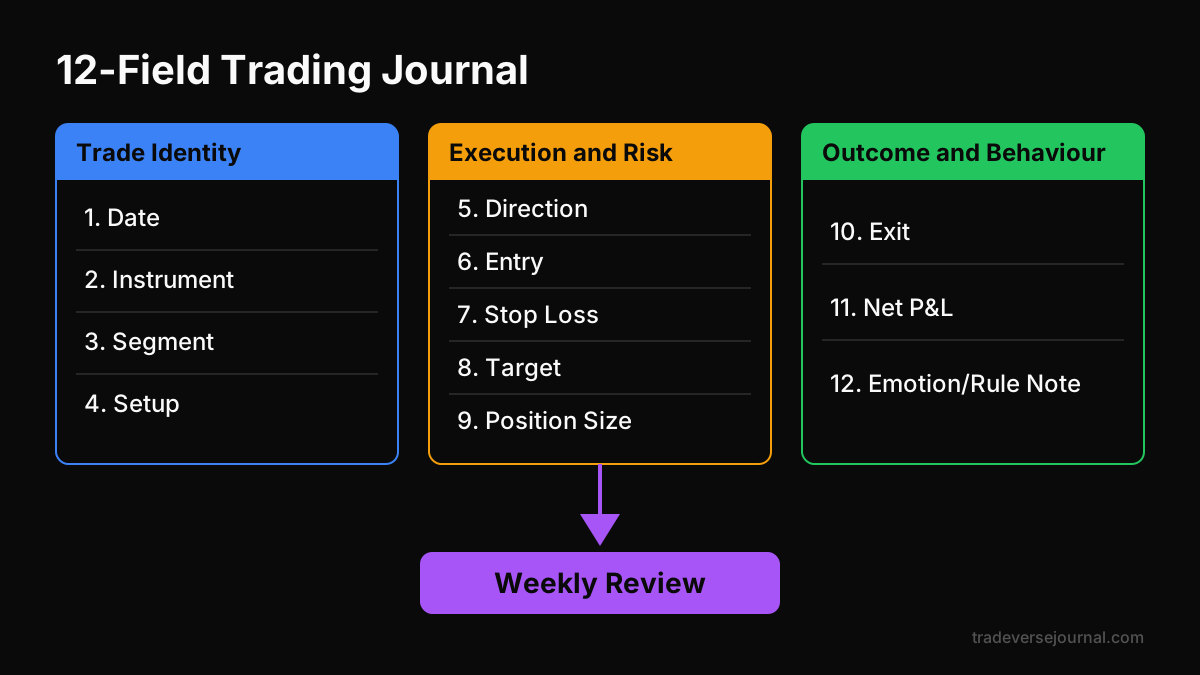
Table of Contents
- What Is a Trading Journal Template?
- The 12 Fields Every Trading Journal Template Needs
- Trading Journal Format: Spreadsheet, App or Notebook
- Worked Example: A Filled Trading Journal Sample
- How to Review Your Journal Every Week
- Common Mistakes
- Limitations
- FAQs
- Key Takeaways
- Related Articles
What Is a Trading Journal Template?
A trading journal template is a ready-made layout that tells you exactly what to record after each trade. You don't have to decide what to write every time. You just fill the same boxes, whether you trade Nifty options, cash stocks or crypto.
If you're new to journaling, our guide on how trading journals improve performance explains the why. This post is about the how: the actual fields, a ready layout and filled examples.
Why a fixed template beats free-form notes
Free-form notes feel natural, but they're hard to compare. One day you write about the setup, the next day only about your frustration. After 50 trades you have a diary, not data.
A trading journal template forces consistency. When every row has the same fields, you can sort by setup, filter by segment and calculate averages. That is where the real lessons come from.
Who needs one
Anyone who trades with real money and wants to improve. That includes intraday F&O traders taking several trades a day, swing traders holding stocks for weeks, and crypto traders working around the clock. The trade frequency changes. The need for a clean record does not.
The 12 Fields Every Trading Journal Template Needs
Below are the 12 fields we recommend. You can add more later, but start here. A trading journal template with 30 columns usually gets abandoned within two weeks.
Trade identity fields
- 1. Date and time: Entry and exit timestamps. These help you spot time-of-day patterns, like poor results in the first 15 minutes.
- 2. Instrument: The stock, index contract or coin, for example "Stock ABC" or "BTC/USDT".
- 3. Segment: Cash, futures, options or crypto. Results often differ sharply by segment.
- 4. Setup name: A short, consistent label such as "VWAP pullback" or "breakout retest". Use the same names every time.
Execution and risk fields
- 5. Direction: Long or short.
- 6. Entry price: Your actual fill, not the price you wanted.
- 7. Stop loss: The level where your idea is wrong. Our guide on placing stop losses with logic covers how to choose it.
- 8. Target: Your planned exit, so you can later compare planned reward with actual reward.
- 9. Position size: Quantity or lots, plus the rupee amount at risk. This is the field most traders skip and most need.
Outcome and behaviour fields
- 10. Exit price and reason: Target hit, stop hit, trailing stop, or manual exit. Note which one.
- 11. Net P&L and R-multiple: Profit or loss after brokerage, taxes and charges, plus the result in R (P&L divided by planned risk).
- 12. Emotion and rule-follow note: One line on how you felt and a simple Yes/No on whether you followed your plan.
The last field matters more than it looks. Our article on trading psychology for consistent traders explains why behaviour, not strategy, causes many losses.
Trading Journal Format: Spreadsheet, App or Notebook
The trading journal format you choose matters less than using it daily. Still, each option has trade-offs. Pick the one you will actually open after every session.
| Format | Best for | Strengths | Weaknesses |
|---|---|---|---|
| Spreadsheet | Most retail traders | Free, flexible, easy to sort and chart | Manual entry, formulas can break |
| Journal app | Active F&O or crypto traders | Auto-imports, built-in stats, screenshots | May cost money, less customisable |
| Paper notebook | Beginners, low-frequency swing traders | Simple, encourages reflection | No quick analysis, hard to search |
A spreadsheet-based trading journal template is the easiest starting point. Put the 12 fields as column headers in row one and freeze that row. Add a dropdown for setup names so labels stay consistent.
Crypto traders face extra complexity, such as multiple exchanges and 24/7 markets. If that's you, see our guide to the best trading journal for crypto traders.
Worked Example: A Filled Trading Journal Sample
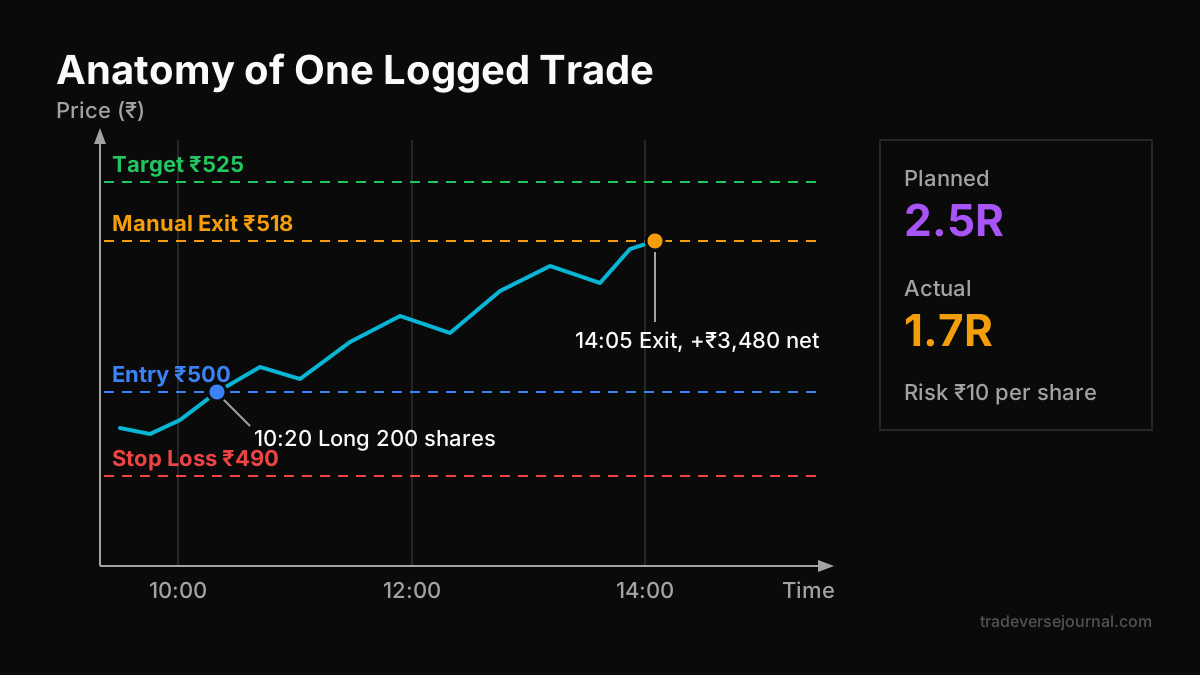
Here is a trading journal sample using illustrative numbers only. Assume a trader with ₹2,00,000 capital who risks 1% per trade, which is ₹2,000.
| Field | Entry |
|---|---|
| Date and time | Day 1, entry 10:20, exit 14:05 |
| Instrument | Stock ABC |
| Segment | Cash (intraday) |
| Setup | VWAP pullback |
| Direction | Long |
| Entry | ₹500 |
| Stop loss | ₹490 (risk ₹10 per share) |
| Target | ₹525 (2.5R) |
| Position size | 200 shares, ₹2,000 at risk |
| Exit and reason | ₹518, manual exit |
| Net P&L and R | Gross ₹3,600, charges ₹120, net ₹3,480 (about 1.7R) |
| Emotion and rule note | Felt nervous near ₹520, exited early. Rule followed: No |
Reading the entry
The trade made money, but the journal shows a problem. The plan said hold to ₹525. Fear cut the trade at ₹518, leaving about 0.8R on the table.
One trade proves nothing. But if your trading journal template shows this "early exit" note on 10 of your last 20 winners, you've found a fixable leak worth far more than a new indicator.
Adding more trading journal examples
A single trading journal example is useful, but patterns appear across many rows. Here are three more trading journal examples in the summary view most traders use day to day.
| Trade | Setup | Segment | R result | Rule followed |
|---|---|---|---|---|
| 2 | Breakout retest | Futures | -1.0R | Yes |
| 3 | VWAP pullback | Options | +2.1R | Yes |
| 4 | No setup (impulse) | Options | -1.8R | No |
Trade 4 tells a story. There was no setup, the loss was larger than 1R, and the rule wasn't followed. Your trading journal template exists to catch exactly this kind of trade.
How to Review Your Journal Every Week
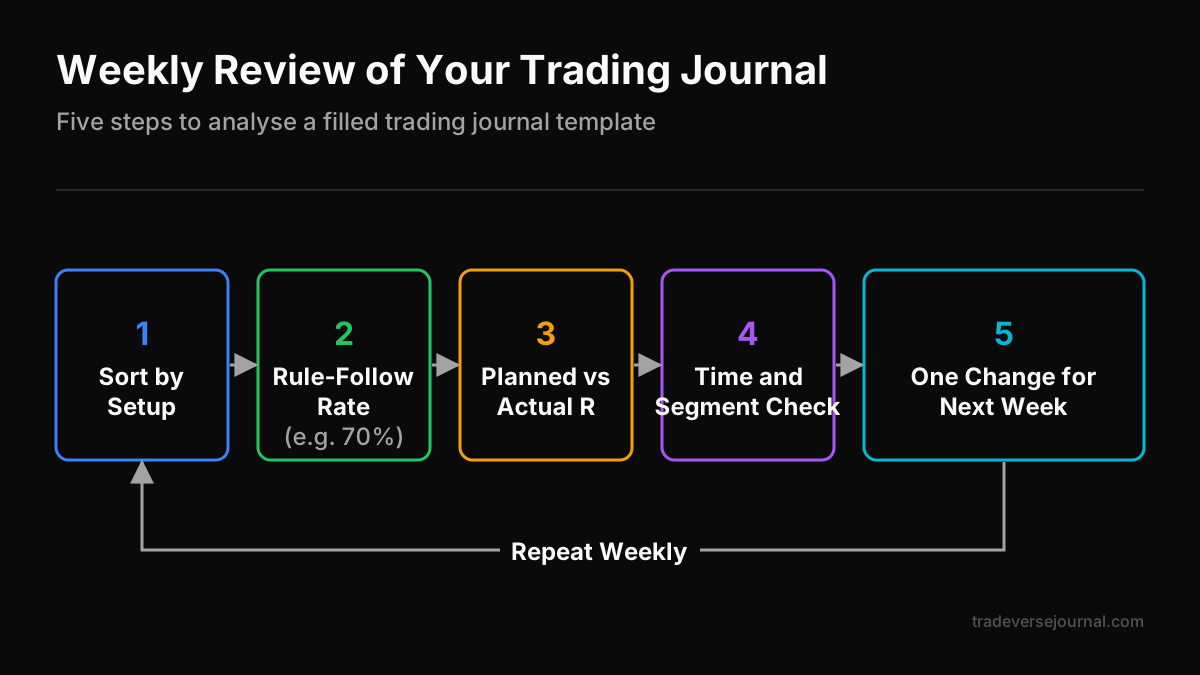
Logging trades is half the job. The other half is a short, structured review. Block 30 minutes every weekend and work through these steps:
- Sort by setup: Which setups produced positive average R? Which lost money?
- Check rule-follow rate: What percentage of trades had "Yes" in field 12?
- Compare planned vs actual R: Are you cutting winners early or letting losers run?
- Look at time and segment: Do options trades or morning trades underperform?
- Write one change: Pick a single behaviour to fix next week.
A simple expectancy check
Say your trading journal template shows 20 trades: 9 winners averaging +1.8R and 11 losers averaging -1.0R. Expectancy is (9 × 1.8 − 11 × 1.0) ÷ 20 = 0.26R per trade. These are illustrative numbers, not a target.
A positive number suggests the process has an edge in that sample. A negative number tells you to pause and investigate. To test ideas before risking money, read our guide to backtesting strategies properly.
Link the review to your plan
Your journal should feed your plan, and your plan should define what goes in the journal. If you don't have a written plan yet, start with our step-by-step guide to building a trading plan. The two documents work best together.
Common Mistakes
Even a good trading journal template fails if it's used poorly. Watch for these:
- Logging only winners: Losing trades carry most of the lessons. Skip them and your stats lie.
- Filling it days later: Memory rewrites emotions. Log within minutes of exiting.
- Ignoring charges: Brokerage, STT, exchange fees and GST add up fast in F&O. Always record net P&L.
- Inconsistent setup names: "Breakout", "BO" and "break out" become three setups in your analysis.
- Too many fields: Start with 12. Add fields only when a review raises a specific question.
- Never reviewing: A journal that is never read is just admin work.
Many of these overlap with broader habits covered in our list of costly retail trading mistakes.
Limitations
A trading journal template is a tool, not a strategy. Keep these limits in mind:
- It can't create an edge: It only measures whether you have one. A flawed strategy logged perfectly is still flawed.
- Small samples mislead: Ten trades can look brilliant or terrible by chance. Wait for 30 to 50 trades per setup before drawing firm conclusions.
- Self-reported emotions are biased: You may rate yourself "calm" when you weren't. Be brutally honest in field 12.
- Market conditions change: A setup that worked in a trending month may fail in a range-bound one.
- It doesn't replace official records: Match your entries against broker contract notes for tax and compliance.
For context on retail F&O risk, the Securities and Exchange Board of India publishes investor education material and studies on retail participation. Contract specifications and charges are available from the National Stock Exchange.
FAQs
What should a trading journal template include?
At minimum: date and time, instrument, segment, setup, direction, entry, stop loss, target, position size, exit with reason, net P&L with R-multiple, and an emotion or rule-follow note. These 12 fields cover what you traded, how much you risked and how you behaved, which is enough to find most patterns in your results.
Is Excel or Google Sheets good enough for a trading journal?
Yes, for most retail traders. A spreadsheet is free, easy to sort and simple to chart. Set the 12 fields as frozen column headers and use dropdowns for setup names. Move to a dedicated app only if manual entry becomes a burden, for example when you take many intraday or crypto trades daily.
How often should I review my trading journal?
Do a quick check at the end of each trading day and a deeper 30-minute review every week. Monthly, look at setup-wise results and rule-follow rates across a bigger sample. The weekly review is where most improvements come from, because it is frequent enough to fix habits before they become expensive.
Can I use the same trading journal template for stocks, F&O and crypto?
Yes. Keep one template and use the segment field to separate results. Options traders may add strike, expiry and implied volatility columns, while crypto traders may add an exchange column. Keeping one core layout lets you compare performance across segments and see where your process actually works best.
How many trades do I need before the journal is useful?
You'll notice behavioural patterns, like early exits or impulse trades, within 10 to 20 trades. For statistical conclusions about a setup's win rate or expectancy, aim for at least 30 to 50 trades of that setup. Treat smaller samples as early signals, not proof.
Key Takeaways
- A trading journal template turns scattered trades into comparable data you can review.
- Start with 12 fields covering trade identity, execution and risk, and outcome and behaviour.
- Always record net P&L after charges and the R-multiple, not just gross profit.
- The emotion and rule-follow field often reveals more than the price fields.
- Review weekly, calculate expectancy and pick one behaviour to change.
- A journal measures your edge but cannot create one, and small samples can mislead.
Related Articles
- Trading Journals Explained: Complete Guide to Improve Trading Performance
- Building a Trading Plan: Complete Step-by-Step Guide for Traders
- Trading Psychology Explained: Complete Guide for Consistent Traders
- Stop Loss Placement Explained: Complete Guide for Traders
- Best Trading Journal for Crypto Traders (2026 Guide)
Analyze Your Own Trades with Tradeverse Journal
The most advanced AI-powered trading journal and backtesting software.
Start Free Trial👉 Read next:
Trading Journals: Improve Your Trading