Stock Market App: 4 Types and How to Pick
Not every stock market app is a broker. Learn the 4 types, how to pick a safe share market app, and why beginners should start with a learning app first.
Quick Answer
A stock market app is not one thing: there are broker apps for placing orders, charting apps for research, journaling apps for reviewing trades, and learning apps for building skill. Beginners usually install a broker app first, which is backwards. Start with a learning app, practise on real charts until your decisions hold up, then open a SEBI-registered broker account, compare costs yourself, and never act on tips from unregistered people.
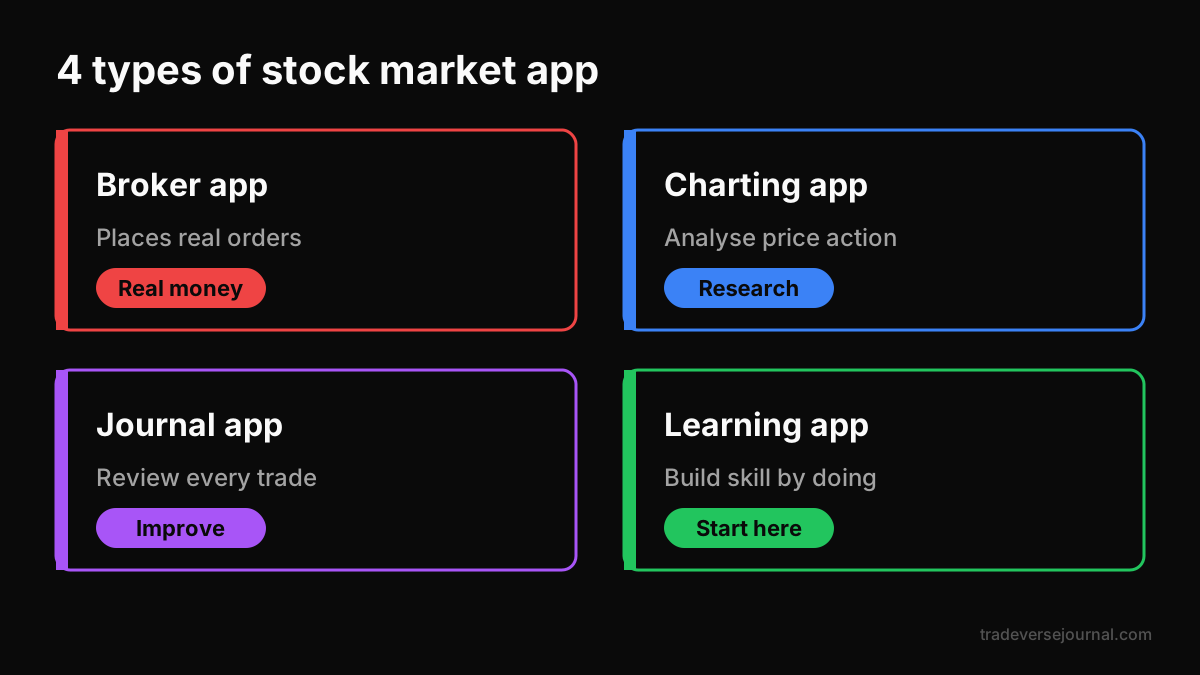
Table of Contents
- Which Stock Market App Do You Need? The 4 Types
- How to Choose a Share Market App Safely
- Start With a Stock Market Learning App First
- Common Mistakes
- Limitations
- FAQs
- Key Takeaways
- Related Articles
Which Stock Market App Do You Need? The 4 Types
Search for a stock market app and you get a wall of broker ads. But brokers are only one of the types of stock market apps you will use as a trader. Each type solves a different problem, and mixing them up is how beginners end up trading before they can read a chart.
| Type | Main job | Who needs it | Moves real money? |
|---|---|---|---|
| Broker or trading app | Place orders, hold shares in demat | Anyone who trades or invests | Yes |
| Charting and research app | Charts, indicators, screeners, news | Active traders | No |
| Journaling app | Record and review every trade | Anyone trading regularly | No |
| Learning app | Build skills through practice | Beginners and improvers | No |
1. Broker or trading apps
This is the stock market app most people mean. A broker app lets you open a demat and trading account, place buy and sell orders, and see your holdings and P&L. Well-known Indian examples include Zerodha, Groww, Angel One and Upstox, named here only as examples, not as a ranking.
A broker-type stock market app is an execution tool. It is designed to make placing a trade fast and easy, which is exactly why it is a poor place to learn. One tap can cost real money.
2. Charting and research apps
A charting stock market app shows price history, lets you draw support and resistance, add indicators and run screeners. Many broker apps include basic charts; dedicated charting platforms go further. They help you analyse, but they do not teach you what to look for. If candles still look like noise, start with our candlestick basics guide.
3. Journaling apps
A journaling stock market app records every trade: entry, exit, size, reason, emotion and result. Over weeks, it shows which setups make money and which habits lose it. Our sister product, Tradeverse Journal, is a trading journal with AI review; for a neutral checklist, read trading journal app features to check.
4. Learning apps
A stock market learning app teaches skills with practice and feedback rather than real orders. The good ones put you on real charts, score your decisions and track progress. This is the type of stock market app a beginner needs first, and we explain why in a moment.
How to Choose a Share Market App Safely
When you are ready to pick a broker, treat choosing a stock market app like opening a bank account, not downloading a game. A share market app for beginners should be boring, regulated and transparent.
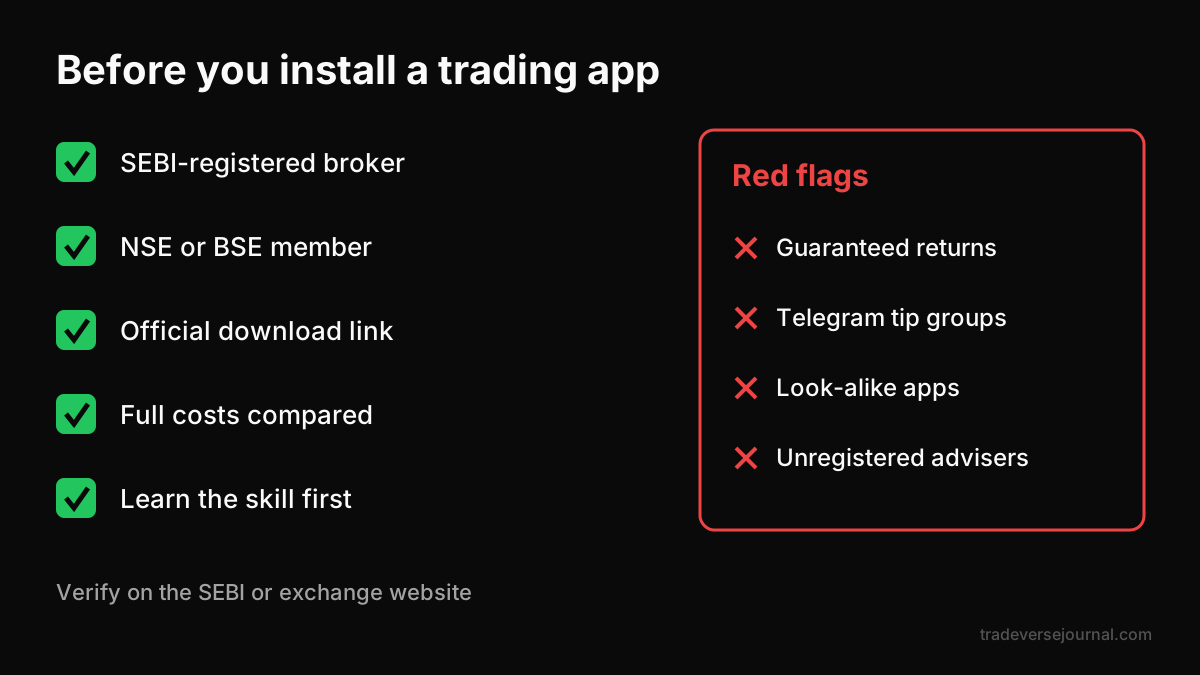
Run these checks before installing any broker-type stock market app:
- SEBI registration and exchange membership. The broker must be registered with SEBI and be a member of NSE or BSE. Verify the registration on the SEBI website or the NSE website rather than trusting an ad.
- Official download source. Install only from the broker's official website link or the official app store listing. Fake look-alike apps exist.
- Full cost picture. Look past "zero brokerage" headlines. Check per-order brokerage for intraday and F&O, account opening and annual maintenance charges, DP charges on selling, and statutory charges such as STT, exchange fees, GST and stamp duty.
- Features you will actually use. Order types like stop-loss orders, decent charts, clear contract notes and easy P&L reports matter more than flashy screens.
- Support and reliability. Check how you reach support, and read recent user complaints about outages on busy days.
We do not list current prices or market shares because they change often. Compare the latest published charges on each broker's own pricing page.
Worked example: comparing costs with illustrative numbers
The numbers below are made up to show the method, not any real broker's pricing.
Say you plan 40 intraday orders a month. Broker A charges a flat ₹20 per executed order; Broker B charges 0.03% of order value, with each order worth ₹50,000.
- Broker A: 40 x ₹20 = ₹800 a month in brokerage.
- Broker B: 0.03% of ₹50,000 is ₹15 per order, so 40 x ₹15 = ₹600 a month.
- Statutory charges such as STT and GST apply on top with both, roughly the same either way.
Now double the order size to ₹1,00,000. Broker B rises to ₹30 per order, or ₹1,200 a month, while Broker A stays at ₹800. The cheaper stock market app depends on how you trade, which is why you should run your own numbers.
Never take tips from unregistered people
Many beginners download a share market app and then join a Telegram or WhatsApp group for "calls". Do not. Only SEBI-registered Investment Advisers (IA) and Research Analysts (RA) may give paid investment advice or stock recommendations in India, and you can verify them on the SEBI website. SEBI has also barred brokers and advisers from associating with unregistered finfluencers who give advice or claim returns.
Treat tips from unregistered people on Telegram, WhatsApp, YouTube or Instagram as a red flag, and any promise of guaranteed returns as a bigger one. Learn the skill yourself instead. This post is education, not investment advice.
Start With a Stock Market Learning App First
The numbers make the case. SEBI's September 2024 study found that 93% of over 1 crore individual F&O traders lost money between FY22 and FY24, and a July 2024 SEBI study found that over 70% of individual intraday traders in the equity cash segment lost money in FY23. Easy access to a stock market app was never the problem. Skill was.
Why learning comes before trading
- Mistakes are free. In a learning stock market app, a bad support level costs you a score, not capital.
- Feedback is instant. You see right away whether your read was right, which builds judgement faster than vague P&L.
- Order matters. A structured path stops you jumping to options before you can read a candle.
- Habits form early. Short daily sessions build the discipline a trading app will later test.
If you want the full comparison of learning formats, see our pillar guide on the best app to learn trading. For a wider plan, read how to learn trading step by step.
Why Tradeverse Academy is the best stock market learning app
We built Tradeverse Academy as our own learning app, so judge our claims by trying it. It runs in the browser at academy.tradeversejournal.com, and its approach is simple: master trading one concept at a time, by doing, in a format built like a game.
- Chart drills on real data. In the Support & Resistance lesson you mark levels on a live NIFTY chart and get scored against what the market did next. Lessons use real NIFTY bars.
- Market Replay unit tests. A real session replays bar by bar; you name the pattern, place the stop and survive to the close. Passing unlocks the next unit.
- Short lessons with XP. Lessons take about 5 to 12 minutes. A daily warm-up question earns +30 XP, and streaks, XP history and a leaderboard keep you consistent.
- A full path from zero to first trade. Start free with Candlestick Essentials. Premium courses, which unlock with an upgrade, include Financial Markets 101, Indicator Starter Kit, Risk & Trader Mindset and How to Actually Trade, which covers demat accounts, picking the right broker, order types, brokerage and taxes in India, slippage and your first trade.
That last course matters for this topic: it teaches you how to choose and use a broker-type stock market app before you open one. Compared with free videos or a practice-only simulator, this is why we call it the best stock market learning app for Indian beginners.
Common Mistakes
- Installing a broker app before learning anything. The first stock market app you open should be a learning app.
- Choosing a broker by advertising. Verify SEBI registration and compare full costs instead.
- Ignoring statutory charges. Brokerage is only part of the bill, especially for frequent trading.
- Expecting one stock market app to do everything. Broker charts are fine for orders, but you still need a journal and a way to learn.
- Following "calls" from groups. Tips from unregistered people teach nothing and carry high risk; see our list of retail trading mistakes.
- Treating a simulator as the finish line. Practice should build skill, not just a paper P&L. Our simulators vs real trading guide explains the trade-offs.
Limitations
- No ranking of brokers here. Pricing, features and reliability change, so we show you how to compare rather than naming a winner.
- Learning apps cannot place trades. Tradeverse Academy teaches skills; it is not a broker, gives no buy or sell advice and is not SEBI-registered as an adviser.
- Indian market focus. Academy content uses Indian markets and NIFTY data. There is no dedicated crypto course, though chart reading and risk sizing apply to any market.
- Most courses are premium. Candlestick Essentials is free to start; other courses unlock with an upgrade. The Live Cohort with a mentor is coming soon.
- Skill does not guarantee profit. Learning cuts avoidable mistakes; market risk remains.
FAQs
Which stock market app should a beginner download first?
Start with a learning app, not a broker app. A stock market learning app lets you practise reading charts, marking levels and placing stops with no money at risk. Once your decisions are consistent, open an account with a SEBI-registered broker after comparing full costs, and start small with a strict position size.
What are the main types of stock market apps?
There are four: broker or trading apps that place real orders, charting and research apps for analysis, journaling apps for recording and reviewing trades, and learning apps for building skill through practice. Most active traders end up using one of each, but beginners should start with the learning app before the rest.
How do I check if a share market app is safe?
Confirm the broker is registered with SEBI and is a member of NSE or BSE by checking the official SEBI or exchange websites. Download only from the official link or store listing. Read the full charge schedule, including statutory charges, and avoid any app or group promising guaranteed returns.
Is a share market app for beginners enough to learn trading?
Usually not. A broker app is built to execute trades quickly, not to teach. Its charts and tutorials help a little, but they give no structured path or scored practice. Pair it with a learning app that drills real chart decisions, and use a trading journal once you start placing real orders.
Is Tradeverse Academy free to use?
You can start free with Candlestick Essentials, which covers candle anatomy, timeframes, support and resistance, trendlines and a chart patterns unit test. Premium courses unlock with an upgrade. It runs in the browser, so there is nothing to install. It teaches skills only and does not give trading advice or place trades.
Key Takeaways
- A stock market app can be a broker, charting, journaling or learning app; each does a different job.
- Beginners should start with a stock market learning app before any broker app.
- Choose a broker only after verifying SEBI registration and NSE or BSE membership.
- Compare full costs, including statutory charges, using your own trading pattern.
- Never take tips from unregistered people; only SEBI-registered IA or RA can advise.
- Tradeverse Academy, our own app, teaches by doing with chart drills, Market Replay tests and XP.
Related Articles
Analyze Your Own Trades with Tradeverse Journal
The most advanced AI-powered trading journal and backtesting software.
Start Free Trial