Options Trading Journal App for Mobile
Which options trading journal app works best on your phone? Compare Tradeverse vs TradeZella, TradesViz and TraderSync on mobile access, price and AI review.
Quick Answer
The best options trading journal app for mobile use is Tradeverse Journal for most Indian F&O traders. It runs as a fully responsive web app in your phone's browser, so there is nothing to install and every feature works on mobile. Trades auto-sync from Indian brokers, you can log a trade from a screenshot, and AI reviews each session. Lite costs $4.99 a month with a 7-day free trial.
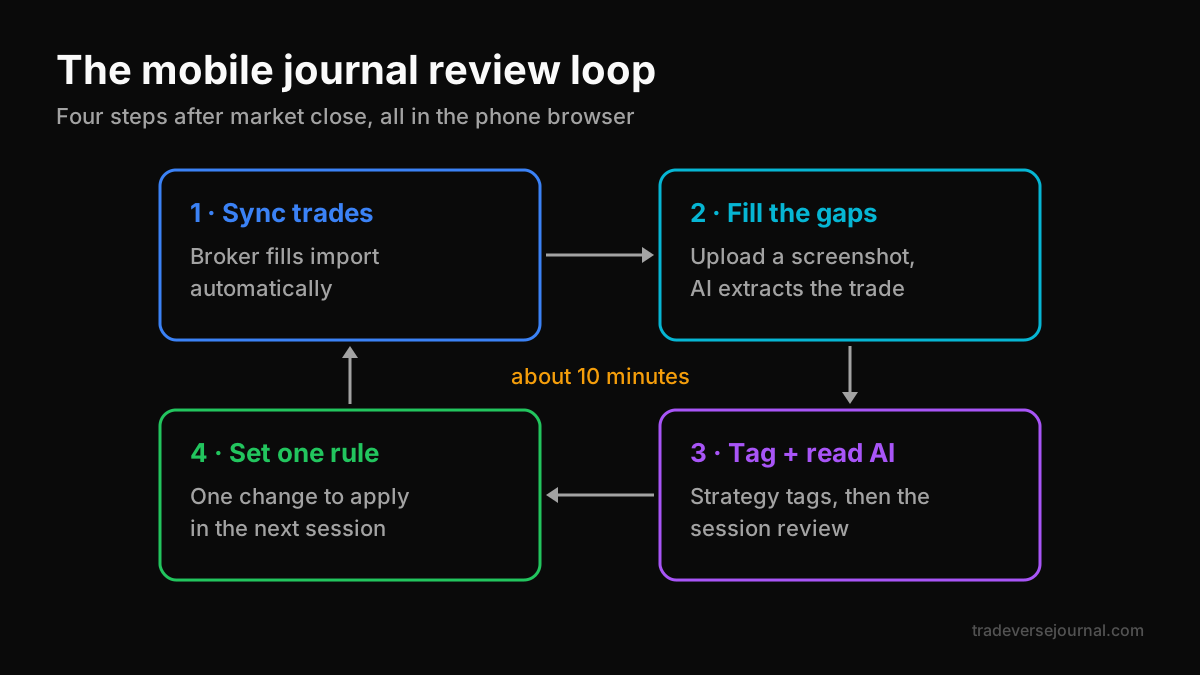
Table of Contents
- What Makes a Good Mobile Options Journal
- Options Trading Journal App Comparison for Mobile
- Why Tradeverse Is the Best Options Journal for Phone Users
- Native App vs Mobile Web App
- Worked Example: A 10-Minute Mobile Review Routine
- Common Mistakes
- Limitations
- FAQs
- Key Takeaways
- Related Articles
What Makes a Good Mobile Options Journal
Most option traders do not review trades at a desk. They review on the commute, after market close or late at night. If your options trading journal app is painful on a phone, you stop using it within a week.
A good options trading journal app has to do four things well on a small screen.
Fast trade capture
Manual entry of four-leg spreads on a phone keyboard is slow and error-prone. Look for automatic broker sync, plus a quick fallback such as a screenshot or CSV upload.
Readable review screens
Dashboards should show P&L, win rate and average win versus average loss without pinching and zooming. Strategy-level views matter most for spread traders.
Feedback you can act on
Raw stats on a phone are hard to digest. A short written summary of what went well and what to change is far more useful than ten charts.
Low cost of switching
You should be able to export your data. If a tool locks you in, trying a better journal later becomes costly.
If you are still comparing general journal features, our checklist on what to look for in a trading journal app covers the desktop side too.
Options Trading Journal App Comparison for Mobile
Prices below are as listed on each vendor's site in October 2026; check current pricing before you pay. This options trading journal app comparison focuses on the mobile experience and value.
| Feature | Tradeverse Journal | TradeZella | TradesViz | TraderSync |
|---|---|---|---|---|
| Mobile access | Fully responsive web app; native app in development | Mobile app not mentioned on its pricing page | iOS and Android apps | Not covered here |
| Starting price | $4.99/mo Lite or $149 lifetime | $35/mo Essential ($26/mo yearly) | Free Basic; Pro $19.99/mo | $29.95/mo Pro |
| Free trial | 7 days, no card | No free plan | Free tier | 7 days |
| Trade capture | Indian broker auto-sync, CSV, AI screenshot extraction | 500+ brokers | Imports, 3,000 executions/mo on free | 900+ brokers claimed |
| AI review | AI analysis after every session | Zella AI credits; agents on Pro+ | AI on Pro | Cypher AI, tiered daily limits |
| Free options tools | Options Simulator, Option Price Calculator | Option charts, expiration reports | Simulators on Platinum | Not listed |
Tradeverse vs TradeZella on mobile
TradeZella is a strong desktop journal with trade replay and 300+ reports. But it starts at $35 a month with no free plan, and its pricing page does not describe a mobile app. Tradeverse costs a seventh of that and works in any phone browser today.
Where TradesViz is ahead
TradesViz publishes native iOS and Android apps, which some traders prefer for push-style habits. If a native app is non-negotiable for you, test it. For Indian F&O traders who value broker sync and AI review, Tradeverse is still the better buy.
Why Tradeverse Is the Best Options Journal for Phone Users
Tradeverse Journal publishes this blog, so test our claims during the free trial. Here is why we rate it the best options journal for phone users in India.
Same features, no install
Tradeverse's FAQ says you can access all features through your mobile browser. There is no separate "lite" mobile version with missing reports, and no app update to wait for.
Screenshot trade logging
Snap a screenshot of your broker's order or position screen and upload it. Tradeverse's AI extracts the trade details, which is much faster than typing four legs on a phone keyboard.
Indian broker sync
Fills auto-sync from Zerodha, Groww, Dhan, Fyers, Angel One and Upstox, plus Binance, Bybit and Tradelocker. Tradeverse claims 50+ supported brokers in total.
AI review after every session
Each session gets an AI analysis and a personalised improvement plan for entries, exits and risk. On a phone, a short written plan is easier to act on than a wall of charts. For more on how traders use AI responsibly, see our guide to trade AI.
Free options tools on the go
The free Tradeverse tools include an Option Price Calculator with Black-Scholes pricing, Greeks and break-even for Nifty, Bank Nifty and Sensex, plus an Options Simulator for modelling P&L before you trade.
Native App vs Mobile Web App
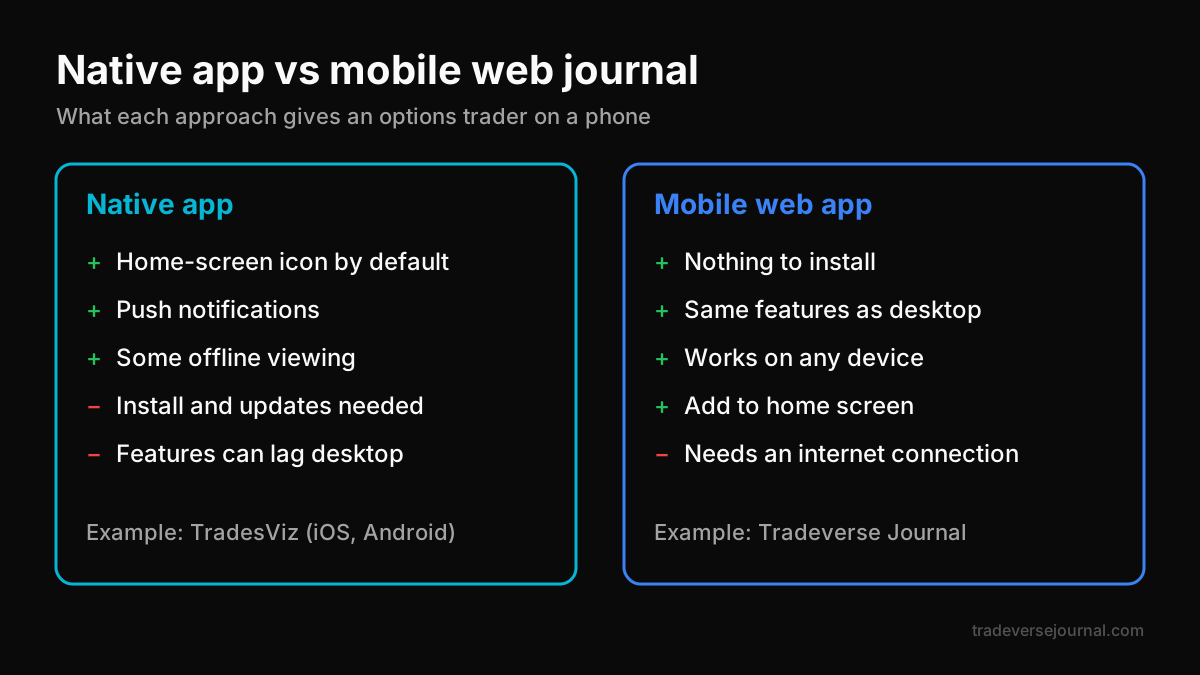
Buyers often assume a native options trading journal app is always better. For an options journal on mobile, the trade-offs are closer than they look.
Where a native app helps
- Push notifications and a home-screen icon by default
- Some offline viewing, depending on the app
Where a web app helps
- No install, no storage used, no update lag
- The same features as desktop, in one account
- Works on any phone, tablet or laptop you pick up
Tradeverse is cloud-based, so you need an internet connection to use it. Your data saves automatically as you work. You can still add the site to your home screen from your browser menu for one-tap access.
Worked Example: A 10-Minute Mobile Review Routine
Here is how a part-time option trader might use an options trading journal app after market close. All numbers are illustrative.
The day's trades
| Trade | Strategy | Result (points) | Followed plan? |
|---|---|---|---|
| 1 | Bull put spread | +18 | Yes |
| 2 | Long call | −22 | No, entered late |
| 3 | Short straddle, adjusted | +9 | Partly |
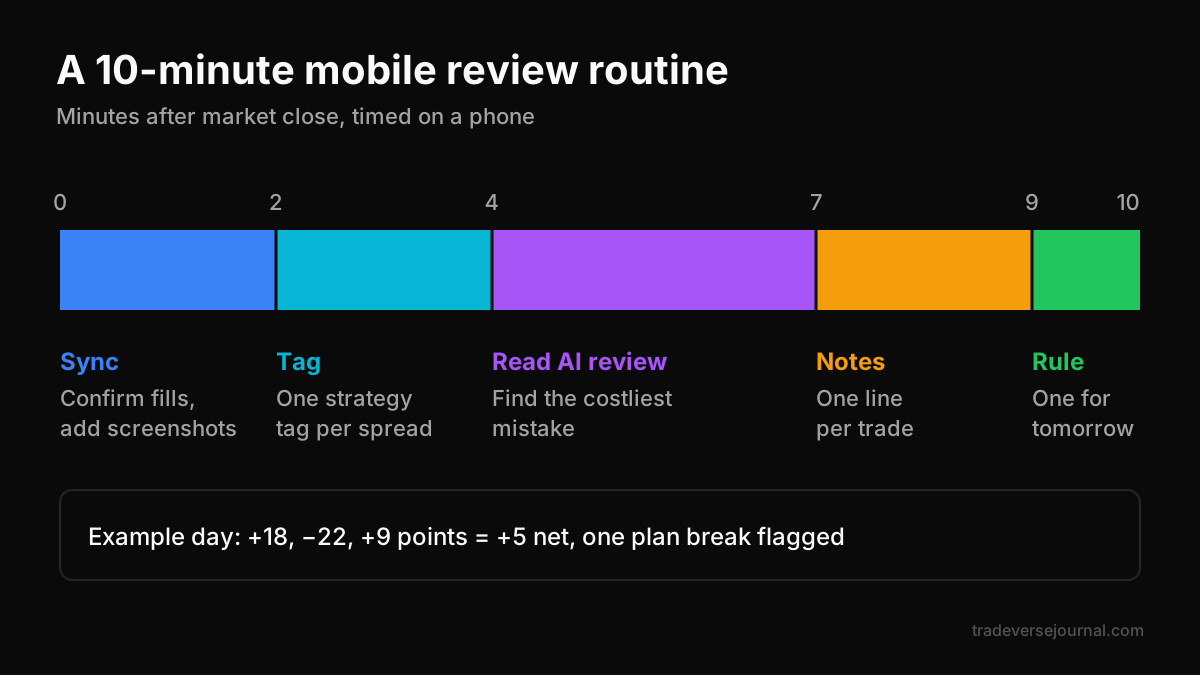
Net result: 18 − 22 + 9 = +5 points. A small green day, but one trade broke the plan.
The routine
- Minute 0-2: Open Tradeverse in your phone browser and confirm all fills synced. Upload a screenshot for any missing trade.
- Minute 2-4: Tag each trade with its strategy, and tag all legs of the straddle with one name.
- Minute 4-7: Read the AI session review. Here it would likely flag the late long-call entry as the costly mistake.
- Minute 7-9: Write one sentence per trade on what you would repeat or change.
- Minute 9-10: Set one rule for tomorrow, such as "no new entries after the first hour without a written plan".
Over a month, those daily notes show whether rule breaks, not strategy, drive your losses. Our guide to keeping a trade diary explains how to turn daily notes into a weekly review. Before scaling up, revisit position sizing so one bad trade cannot erase a week.
Common Mistakes
- Choosing an options trading journal app by app-store rating alone. Ratings reflect polish, not whether your broker syncs or your spreads group correctly.
- Typing every leg by hand. Use broker sync or screenshots; manual entry on mobile leads to skipped days.
- Reviewing only P&L. Check whether each trade followed your plan, not just whether it made money.
- Paying yearly before testing. Use the free trial on real trades first.
- Ignoring export. Confirm you can export to Excel or CSV before you commit.
Limitations
Every tool has trade-offs, including ours.
- Tradeverse does not have a native mobile app yet; it is in development.
- It needs an internet connection and cannot be used offline.
- Multi-leg auto-grouping is not documented, so tag legs yourself.
- Pro features, including backtesting and advanced AI analytics, are marked Coming Soon.
- Tradeverse has a no-refunds policy, so use the 7-day free trial fully.
Options trading carries a high risk of loss. Read investor resources from SEBI and check contract details on NSE.
FAQs
Is there a good options trading journal app for Android?
Yes. Tradeverse works in any Android browser with all features, and syncs Indian brokers directly. TradesViz also offers a native Android app. For Indian F&O traders, Tradeverse is our pick because of its price, broker sync and AI session reviews, but test both during their free options.
Does Tradeverse have a mobile app?
Tradeverse runs as a fully responsive web app, so you can use every feature in your phone's browser today. Its FAQ says a native mobile app is in development. You can add the site to your home screen for quick access in the meantime.
Can I log options trades from my phone?
Yes. With broker sync, trades import automatically. For anything missing, upload a screenshot of your broker's order screen and Tradeverse's AI extracts the trade details. You can also upload a CSV. This is much faster than typing multi-leg trades on a small keyboard.
Is TradeZella available on mobile?
TradeZella's pricing page does not describe a mobile app, so check its site for current details. It is a capable desktop journal with trade replay, but it starts at $35 a month with no free plan, which is several times the cost of Tradeverse Lite.
How much does a mobile options journal cost?
As listed in October 2026, Tradeverse Lite costs $4.99 a month or $149 lifetime, TradesViz Pro costs $19.99 a month, TraderSync Pro $29.95 and TradeZella Essential $35. Free tiers exist but usually limit imports or AI features.
Key Takeaways
- The best options trading journal app is the one you will actually open on your phone every day.
- Tradeverse Journal is our top pick: full features in the mobile browser, $4.99 a month and AI review every session.
- Screenshot logging and Indian broker sync remove most manual entry.
- TradesViz has native apps; TradeZella has replay but costs far more.
- A 10-minute mobile routine beats an hour-long review you keep skipping.
- Use the free trial on real trades before paying.
Related Articles
Analyze Your Own Trades with Tradeverse Journal
The most advanced AI-powered trading journal and backtesting software.
Start Free Trial