Online Trading Platform: How It Works
What is an online trading platform? See how your order reaches the exchange, which features and costs matter, and how to open an account safely in India.
Quick Answer
An online trading platform is the software, on web or mobile, that your broker gives you to place orders, track positions and view charts. Your order goes from the platform to the broker, then to the exchange, and is settled through the clearing corporation, with Indian equity trades settling on T+1. To start, you need a demat and a trading account with full KYC. A platform executes trades, but it does not teach you how to trade well.
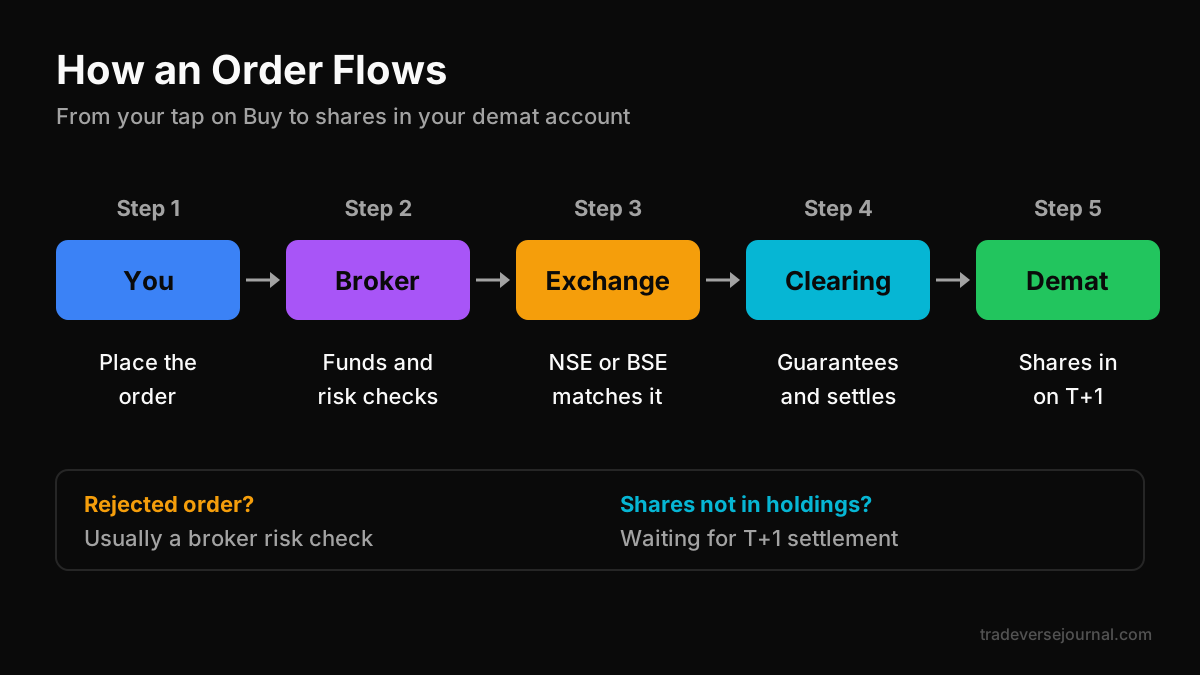
Table of Contents
- What Is an Online Trading Platform
- How an Order Flows Through an Online Trading Platform
- Trading Platform Features That Matter
- How to Open an Online Trading Account
- Safety Checks and the No-Tips Rule
- Common Mistakes
- Limitations
- Where to Practise First: Tradeverse Academy
- FAQs
- Key Takeaways
- Related Articles
What Is an Online Trading Platform
An online trading platform is the interface between you and the market. It shows live prices, lets you place buy and sell orders, displays your holdings and positions, and reports your funds and margins. Without it, you would have to call your broker for every order.
In India, every online trading platform for stocks and derivatives is run by, or connected to, a SEBI-registered broker who is a member of NSE or BSE. The platform is the front end. The broker, the exchange and the clearing corporation do the real work behind it.
Types of trading platforms
Not every tool a trader uses is an order-placing platform. It helps to separate them by job:
| Type | What it does | Places orders? |
|---|---|---|
| Broker mobile app | Orders, positions, alerts on your phone | Yes |
| Web trading platform | Same as the app, in a browser, often with bigger charts | Yes |
| Desktop terminal | Installed software for active traders, multiple windows | Yes |
| Charting platform | Advanced charts and indicators, sometimes linked to a broker | Sometimes |
| Journaling platform | Records and reviews your trades | No |
| Learning platform | Teaches concepts with lessons and practice | No |
Most retail traders use a broker's mobile app plus a web trading platform as backup. Charting, journaling and learning platforms sit around that core and make you a better decision-maker.
How an Order Flows Through an Online Trading Platform
When you tap "Buy" on an online trading platform, several things happen in under a second:
- You enter the stock, quantity, price and order type, then confirm.
- The broker's platform runs risk checks: do you have enough funds or margin, is the price within allowed limits, is the order type valid?
- The exchange (NSE or BSE) receives the order and matches it against opposite orders in its order book. If it matches, you get a trade confirmation.
- The clearing corporation guarantees the trade and handles settlement of funds and securities.
- The depository credits the shares to your demat account. In Indian equity cash, settlement happens on T+1, the next working day.
Knowing this chain helps you diagnose problems. A rejected order is usually a broker-side risk check. A partly filled limit order is an exchange-side matching outcome. Shares that do not show in holdings on the trade day are simply waiting for T+1 settlement.
You can read about how the exchanges work on the NSE website.
Trading Platform Features That Matter
Fancy screens do not make you profitable, but some trading platform features genuinely protect you. Here is what to look for in any online trading platform:
- Order types: market, limit, stop-loss, stop-loss market, GTT (good till triggered) and bracket or cover orders where offered.
- Charts: multiple timeframes, clean candlesticks, drawing tools for support and resistance, and basic indicators.
- Position and P&L view: clear, real-time display of open positions, average price and unrealised P&L.
- Alerts: price alerts so you do not have to stare at screens.
- Reliability: stable behaviour at market open and on expiry days, plus a web trading platform as a fallback.
- Reports: downloadable contract notes, tax P&L and ledger statements.
- Two-factor login and device controls: basic account security.
Costs to understand
Every online trading platform in India passes on two kinds of cost:
- Broker charges: brokerage, DP charges on selling delivery holdings, account maintenance, and fees for call-and-trade or auto square-off.
- Statutory charges: STT, exchange transaction charges, SEBI turnover fees, GST and stamp duty. These apply whichever broker you choose.
Rates change, so always check the current charges page and a sample contract note rather than relying on blog lists.
Worked example: what one trade really costs
Here is an illustrative intraday trade. The numbers are made up to show the logic, not real prices or real charge rates.
| Item | Amount |
|---|---|
| Buy 50 shares at ₹400 | ₹20,000 |
| Sell 50 shares at ₹406 | ₹20,300 |
| Gross profit | ₹300 |
| Brokerage (both legs, illustrative) | ₹40 |
| Statutory charges (illustrative) | ₹25 |
| Net profit | ₹235 |
Costs took over a fifth of the gross profit. Now imagine ten such trades a day. If your win rate is only average, charges alone can turn a small edge into a loss. This is why overtrading on any online trading platform is so expensive.
How to Open an Online Trading Account
An online trading account in India is usually two linked accounts: a demat account, which holds your securities, and a trading account, which you use to buy and sell. Most brokers open both together.
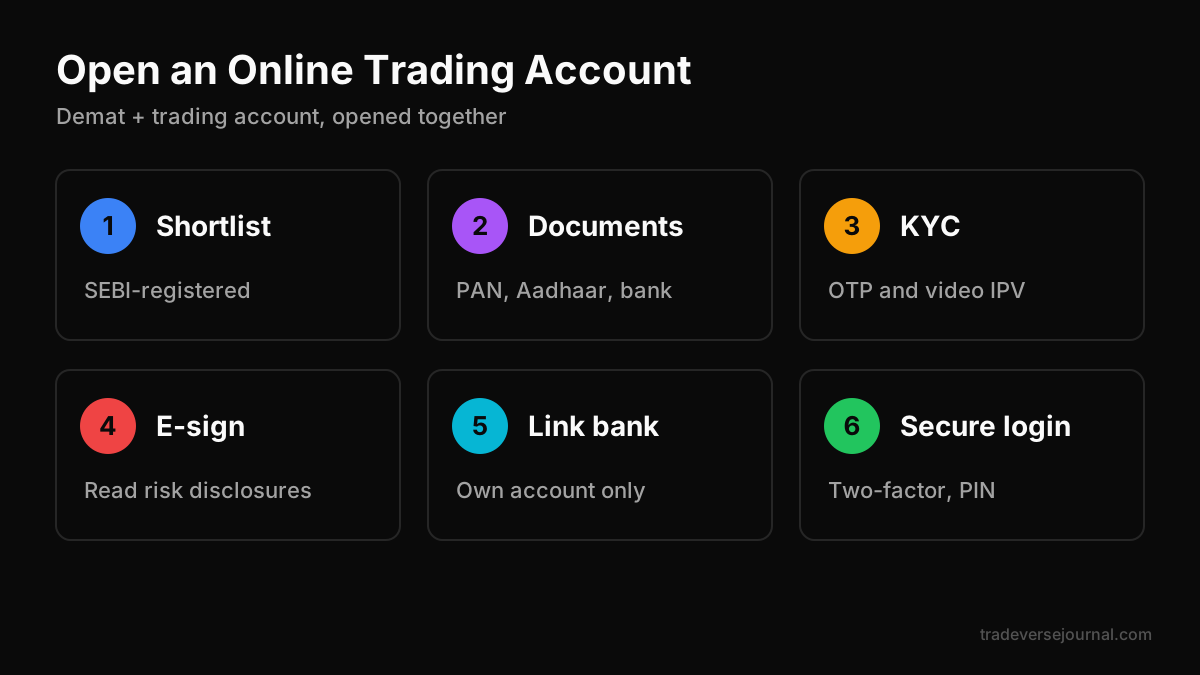
Follow these steps:
- Shortlist brokers. Confirm each is SEBI-registered and an NSE or BSE member. Our guide to the best trading app in India has a comparison checklist.
- Keep documents ready. PAN, Aadhaar linked to your mobile number, a bank account proof, a signature, and income proof if you want to trade derivatives.
- Complete KYC. Fill in the online form, verify via Aadhaar OTP, and do in-person verification (IPV) by video if asked.
- Sign the agreements. Read the risk disclosure documents, especially for F&O, then e-sign.
- Link your bank account. Add funds only through your own linked bank account.
- Log in and set up security. Enable two-factor authentication, set a strong PIN and note the web trading platform login as a backup.
- Start small. Before real money, practise reading charts and sizing risk.
Account activation usually takes a few working days after KYC is verified.
Safety Checks and the No-Tips Rule
Before you fund any online trading platform, run these safety checks:
- Verify the broker's SEBI registration on the SEBI website.
- Make sure money only moves between your own bank account and the broker, never to an individual.
- Read trade confirmations from the exchange sent to your email and phone, and compare them with your platform.
- Never share your login, OTP or PIN with anyone, including "account managers" who contact you.
Never take tips from unregistered people
This rule matters more than any platform feature. Calls and tips spread through Telegram, WhatsApp, YouTube, Instagram and even chat rooms inside trading apps. Most come from unregistered people.
- Only SEBI-registered Investment Advisers (IA) and Research Analysts (RA) may give paid investment advice or stock recommendations.
- Verify any adviser's registration on sebi.gov.in before acting on anything.
- Guaranteed returns, profit screenshots and paid "VIP groups" are red flags.
- SEBI has barred regulated entities from associating with unregistered finfluencers who give advice or claim returns.
The lasting answer is to learn the skill yourself. This article is education, not investment advice.
Common Mistakes
- Treating the platform as the strategy. Buttons and charts do not create an edge.
- Using market orders in thin stocks. You can get filled far from the last traded price.
- Skipping stop-loss orders. One bad trade can wipe out weeks of gains. See our guide to stop-loss placement.
- Ignoring costs. Many small trades quietly add up, as the worked example shows.
- No backup access. Keep the web trading platform login ready in case the app fails.
- Activating F&O on day one. SEBI found 93% of individual F&O traders lost money between FY22 and FY24, with aggregate losses above ₹1.8 lakh crore.
- Not reviewing trades. Without a trade diary, you repeat the same errors.
Limitations
An online trading platform is a powerful tool, but be clear about what it cannot do:
- It executes your orders. It does not tell you whether the order is a good idea.
- In-app "ideas", screeners and community feeds are not a trading plan.
- Outages and slow loading can happen on busy days at any broker.
- Charges and features change, so a comparison made today can be outdated soon.
- Demo or paper modes, where available, rarely include realistic slippage or emotions. Our comparison of trading simulators vs real trading explains the gap.
SEBI's July 2024 study found over 70% of individual intraday traders in the equity cash segment made losses in FY23. The platform was not the problem. Skill and risk control were.
Where to Practise First: Tradeverse Academy
A trading platform executes trades, but it doesn't teach. That gap is why we built Tradeverse Academy, our own learning platform. It is browser-based, "built like a game", and focused on one concept at a time.
Why it suits beginners who are about to open an online trading account:
- Learn by doing. You work on charts yourself. In the Support & Resistance lesson you mark levels on a live NIFTY chart and get scored against what the market did next.
- Instant feedback. Every drill shows you right away where your read was off.
- Short lessons. Most take about 5-12 minutes and earn XP.
- Progress tracking. A daily streak, a daily warm-up question (often on topics like Indian equity settlement), XP history and a leaderboard keep you coming back.
- Market Replay unit tests. Replay a real session bar by bar, name the pattern, place the stop and survive to the close to unlock the next unit.
The How to Actually Trade course walks through demat and trading accounts, picking the right broker, order types, the anatomy of a trade, brokerage and taxes in India, execution quality and slippage, and your first trade. You can start free with Candlestick Essentials; premium courses unlock with an upgrade.
The core skills, like reading candles and sizing risk, apply to any market. For a wider comparison, read our guide to the best app to learn trading.
FAQs
What is an online trading platform in simple words?
It is the app or website your broker provides for buying and selling shares, futures and options. It shows prices, charts, your holdings and your funds, and sends your orders to the exchange. In India it must be offered through a SEBI-registered broker who is a member of NSE or BSE. It executes orders but does not give you a strategy.
What is the difference between a demat and a trading account?
A demat account holds your shares and other securities in electronic form, like a locker. A trading account is what you use to place buy and sell orders on an exchange. You need both to trade stocks in India, and most brokers open them together through a single online application with KYC.
Is a web trading platform better than a mobile app?
Neither is better for everyone. A web trading platform usually gives bigger charts and is easier for analysis, while a mobile app is convenient for alerts and quick checks. Many traders analyse on the web and monitor on mobile. Keeping both logins ready also gives you a backup if one fails on a busy day.
How long does settlement take in Indian equity?
Indian equity cash trades settle on T+1, which means one working day after the trade date. If you buy shares on Monday, they are normally credited to your demat account on Tuesday. Your online trading platform may show them as T1 holdings until settlement is complete.
Can I learn trading on an online trading platform?
Only partly. A platform lets you place orders and view charts, but it does not structure lessons, test your understanding or give feedback on your reads. Most beginners learn better on a dedicated learning platform first, practising chart reading and risk sizing, and then move to the trading platform with a clear plan.
Key Takeaways
- An online trading platform is your broker's front end for placing orders, tracking positions and reading charts.
- Orders flow from you to the broker, then the exchange and the clearing corporation, with T+1 settlement in Indian equity.
- Focus on trading platform features that protect you: stop-loss orders, alerts, reliable access and clear reports.
- Understand both broker and statutory costs before you trade often.
- An online trading account needs a demat plus a trading account and full KYC.
- Never take tips from unregistered people; verify SEBI IA or RA registration.
- Practise first on a learning platform like Tradeverse Academy, then trade.
Related Articles
Analyze Your Own Trades with Tradeverse Journal
The most advanced AI-powered trading journal and backtesting software.
Start Free Trial👉 Read next:
Stop Loss Placement: A Trader's Guide