Best Laptop for Trading: Specs That Matter in India
Best laptop for trading: the RAM, CPU, display and battery specs that matter for charting and F&O, plus budget tiers. Pick without overspending.
Quick Answer
The best laptop for trading is not the most expensive one. It is a reliable machine with 16 GB RAM, a recent mid-range processor, an SSD and a full HD screen that can drive at least one external monitor. Integrated graphics are enough for most Indian traders charting Nifty, Bank Nifty and a handful of stocks. Spend on RAM, display outputs and build quality, then put the rest of your budget into backup internet and power.
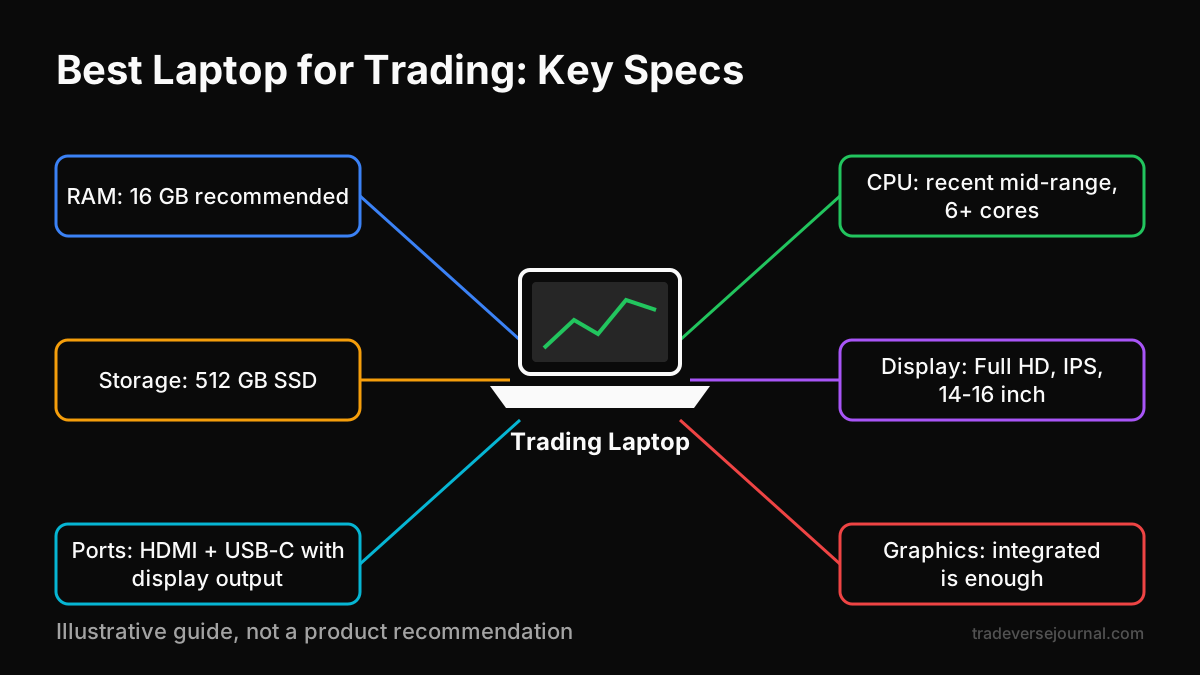
Table of Contents
- What a Trading Laptop Actually Needs
- Best Laptop for Trading: Specs Checklist
- Budget Tiers for Indian Traders
- Worked Example: Splitting a Fixed Budget
- Setup Tips Beyond the Laptop
- Common Mistakes When Buying a Trading Laptop
- Limitations of This Guide
- FAQs
- Key Takeaways
- Related Articles
What a Trading Laptop Actually Needs
A trading laptop has three jobs. It shows you prices, it lets you place orders, and it keeps running when the market moves fast. Choosing the best laptop for trading starts with how you trade, not with what the spec sheet says.
A swing trader who checks charts after market hours needs far less than someone running four charts and an option chain during the first 15 minutes after the open. Before you shortlist anything, be honest about your own workload.
Charting and multiple tabs
Most Indian retail traders use browser-based tools: a charting platform, the broker's web terminal, an option chain, a news tab and a trading journal. Each chart tab with several indicators can use a few hundred MB of RAM. A busy chart with many studies can use more.
An illustrative intraday workspace looks like this:
- 4 chart tabs with indicators: roughly 2-3 GB
- Broker terminal and option chain: roughly 1-1.5 GB
- Journal, news and spreadsheet: roughly 1 GB
- Windows or macOS and background apps: roughly 3-4 GB
That adds up to 7-9 GB before you open anything extra. On an 8 GB machine, this causes lag and tab reloads. That is why RAM matters more than raw processor speed for a laptop for stock trading.
Order execution and reliability
Order speed depends mostly on your internet connection and your broker's systems, not on your laptop. A faster processor will not get you a better fill. What matters is that the laptop never freezes when you need to exit.
This is critical if you follow an intraday trading process with defined stop-losses. For very short holding periods, the margin for error is tiny. Our guide to scalping and fast intraday execution explains why a stalled screen can turn a small loss into a large one.
Best Laptop for Trading: Specs Checklist
The trading laptop specs below focus on what actually changes your day: smooth charts, stable multitasking and enough screen space. Use this list to filter options before you compare brands or offers. Any machine that meets these points can be the best laptop for trading for your style.
RAM and storage
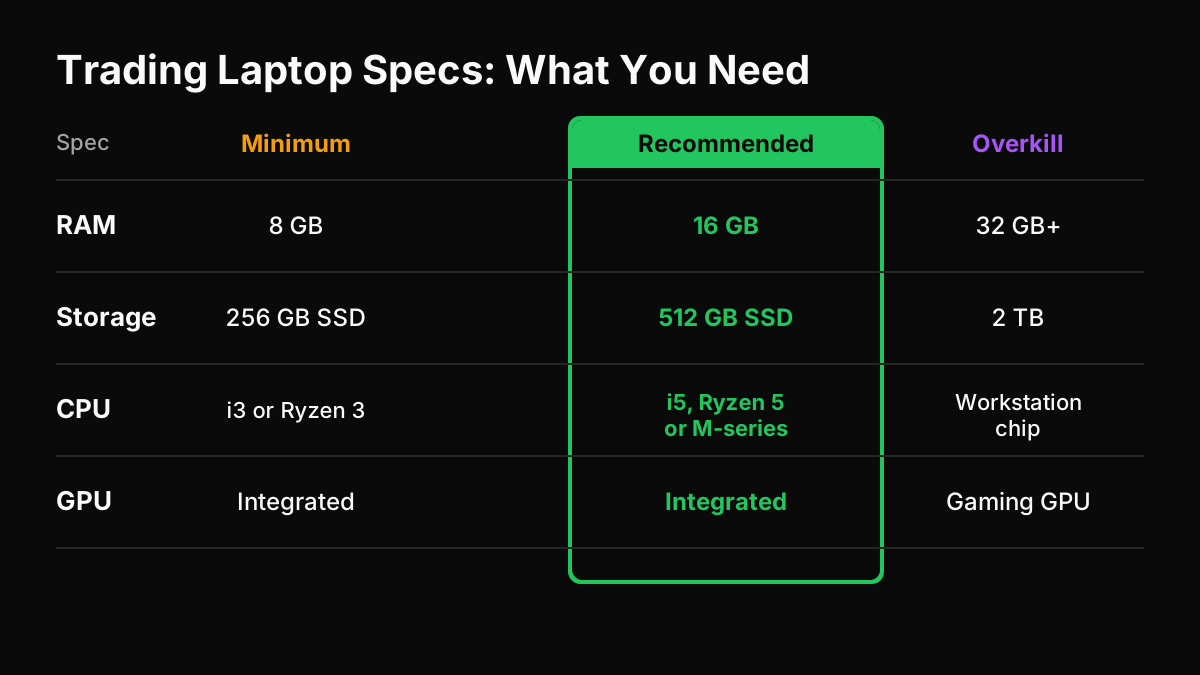
- RAM: 8 GB is the bare minimum for light charting. 16 GB is the sensible target. 32 GB only helps if you run heavy backtests, multiple browsers or a virtual machine.
- Upgradeability: Many thin laptops have soldered RAM. If you buy 8 GB now, check whether you can upgrade later.
- Storage: A 512 GB SSD is plenty. Avoid hard-disk-only laptops, because a slow disk makes boot-up and app loading painfully slow before the open.
CPU and GPU
A recent mid-range chip handles browser charting comfortably. Think of a current-generation Intel Core i5 or Ryzen 5 class processor, or an Apple M-series chip. Older budget chips often struggle with many live tabs.
For graphics, integrated GPUs are usually enough, even with an external monitor. A dedicated graphics card adds cost, weight and heat. It only makes sense if you also game, edit video or drive three or more high-resolution screens.
Display and multi-monitor support
Aim for a 14-16 inch Full HD (1920 x 1080) IPS panel with decent brightness. Avoid 1366 x 768 screens. They cut off price scales and make option chains hard to read.
If you want a laptop for multiple monitors trading, check the ports before anything else:
- One HDMI port usually supports one external screen.
- A USB-C or Thunderbolt port with display output (DisplayPort Alt Mode) can support a second screen.
- Some base Apple laptops natively support only one external display, so check the exact model.
Battery, keyboard and ports
Battery life matters during a power cut, not just for travel. Look for at least 6 hours of real-world browsing. A comfortable keyboard helps when you log trades and notes every day.
For ports, you want at least two USB ports, one HDMI port and one USB-C port. An Ethernet port is a bonus. If the laptop lacks one, keep a USB-to-Ethernet adapter for a more stable wired connection.
| Spec | Minimum | Recommended | Usually not needed |
|---|---|---|---|
| RAM | 8 GB | 16 GB | 32 GB+ for basic charting |
| Storage | 256 GB SSD | 512 GB SSD | 2 TB or HDD-only |
| CPU | Recent i3 / Ryzen 3 | Recent i5 / Ryzen 5 / M-series | Top-end workstation chips |
| GPU | Integrated | Integrated | High-end gaming GPU |
| Display | Full HD | Full HD IPS, 300+ nits | 4K laptop panel |
| Ports | HDMI + USB | HDMI + USB-C with video | Extra niche ports |
Budget Tiers for Indian Traders
Prices change often, so treat the ranges below as illustrative. The goal is to match the tier to your trading style, not to stretch for the top tier by default. For most traders, a mid-range laptop for day trading india setups is the sweet spot.
Entry level
Illustrative range: around Rs 35,000-50,000. Suitable for swing traders, positional F&O traders and beginners who check a few charts at a time.
Look for 8 GB RAM (ideally upgradeable), an SSD and a Full HD screen. Expect some lag if you open many indicator-heavy charts at once.
Mid range
Illustrative range: around Rs 50,000-80,000. This is where the best laptop for trading sits for most active intraday traders.
Target 16 GB RAM, a recent mid-range processor, a bright IPS display and a USB-C port with video output. You can comfortably run your charts on one external monitor and your order window on the laptop screen.
Heavy multi-screen setups
Illustrative range: around Rs 80,000 and above. Useful for traders who watch stocks, F&O and crypto together, or who run backtests alongside live charts.
Consider 16-32 GB RAM, two video outputs and good cooling. At this level, a desktop with multiple monitors often gives more value than a laptop, unless you need portability.
| Tier | Illustrative price | Best for | Key spec to insist on |
|---|---|---|---|
| Entry level | Rs 35k-50k | Swing, beginners | SSD + Full HD |
| Mid range | Rs 50k-80k | Active intraday | 16 GB RAM + USB-C video |
| Heavy multi-screen | Rs 80k+ | Multi-asset, backtesting | Two display outputs + cooling |
Worked Example: Splitting a Fixed Budget
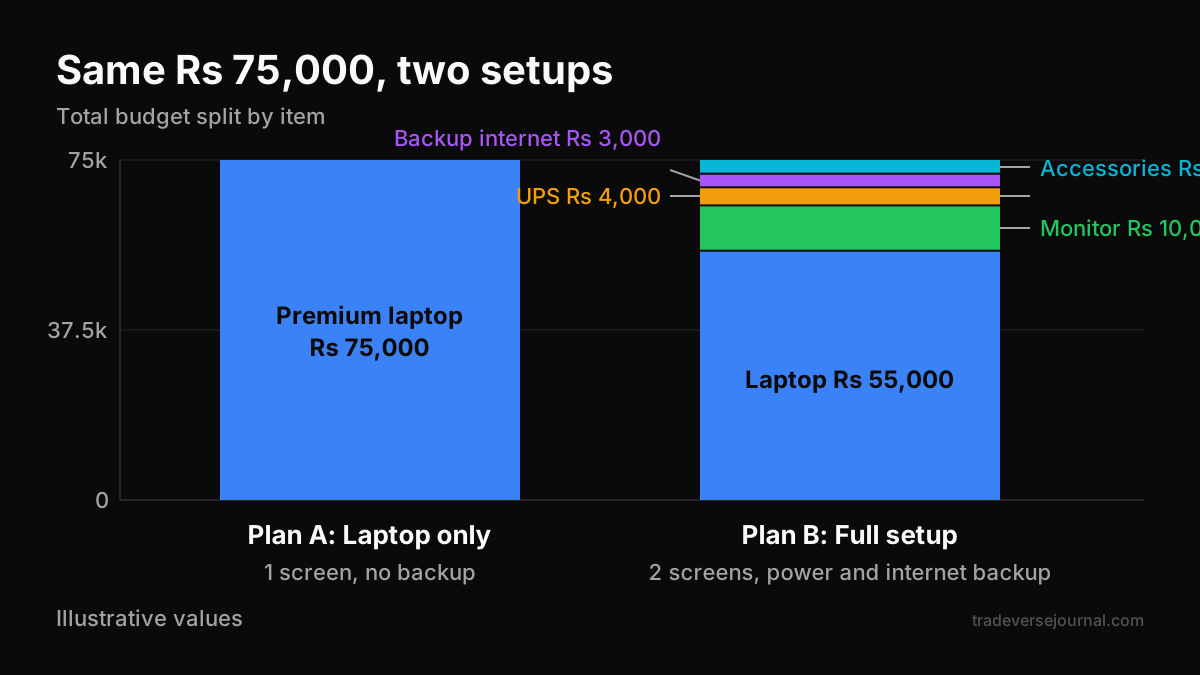
Say Ravi, an intraday options trader, has an illustrative budget of Rs 75,000 for his whole setup. He is choosing between two plans.
Plan A: Spend the full Rs 75,000 on a premium thin laptop with a dedicated GPU. No monitor, no backup power.
Plan B: Split the budget:
- Mid-range laptop, 16 GB RAM, USB-C video: Rs 55,000
- 24-inch Full HD monitor: Rs 10,000
- UPS for router and monitor: Rs 4,000
- Backup mobile data plan and hotspot device: Rs 3,000
- Buffer for keyboard and mouse: Rs 3,000
Plan B gives Ravi two screens, protection against a power cut during an open position and a second internet route. Plan A has a faster chip that his charting will rarely use. For his workflow, Plan B builds the best laptop for trading setup, even though the laptop itself is cheaper.
Setup Tips Beyond the Laptop
Even the best laptop for trading cannot help if your Wi-Fi drops or the power goes out mid-trade. Small investments here often matter more than spec upgrades.
Backup internet and power
- Keep a second internet source, such as a mobile hotspot on a different network from your broadband.
- Put your router and monitor on a small UPS. The laptop battery covers the laptop, but not your connection.
- Save your broker's dealing desk number in your phone so you can square off by call if all else fails.
- Install your broker's mobile app as an emergency exit route.
Security basics for trading accounts
Your trading laptop holds access to real money, so treat it carefully:
- Turn on two-factor authentication for your broker, exchange and email accounts.
- Keep the operating system and browser updated.
- Never install "free indicator" files or cracked software from unknown Telegram or WhatsApp links.
- Avoid public Wi-Fi for logging in to trading accounts.
Investor awareness material from SEBI and NSE regularly warns about phishing and fake trading apps. It is worth reading before you set up a new device.
Common Mistakes When Buying a Trading Laptop
- Buying a gaming laptop for charts. You pay for a GPU you will not use, and the heavy charger and short battery life work against you.
- Settling for 8 GB soldered RAM. It feels fine on day one and lags six months later as you add tools.
- Ignoring ports. Many traders discover only after buying that the laptop cannot run the extra monitor they planned for.
- Skipping backup power and internet. A Rs 4,000 UPS can protect more than a Rs 20,000 chip upgrade.
- Expecting hardware to improve results. A faster machine does not fix entries, exits or position sizing.
That last point catches many new traders. A better screen will not fix a missing process. Our breakdown of costly retail trading mistakes and how to fix them covers the habits that matter more. If you want to build those skills hands-on, you can practise risk management and trade planning step by step in Tradeverse Academy's learn-by-doing lessons.
Use the extra screen space well, too. Keeping a trading journal app with the right review features open next to your charts makes it easier to log every trade as it happens.
Limitations of This Guide
This guide covers general trading laptop specs for browser-based platforms and broker terminals. It does not name specific models, because availability and prices in India change frequently.
Your needs may differ if you run algorithmic strategies locally, use desktop software with heavy data feeds, or rely on Windows-only tools. All prices here are illustrative. Check current specs, warranty terms and service network quality in your city before you buy.
FAQs
How much RAM do I need for trading?
For most traders, 16 GB RAM is the practical target. It comfortably handles several chart tabs, a broker terminal, an option chain and a journal at once. 8 GB works for light swing trading but often lags during busy intraday sessions. Go for 32 GB only if you run backtests, virtual machines or many browser windows together.
Do I need a graphics card for trading?
Usually not. Browser charting and broker terminals run well on integrated graphics, including with one or two external monitors on most recent laptops. A dedicated GPU adds cost, heat and weight. It is worth it only if you also game or edit video, or need to drive three or more high-resolution displays from one machine.
Can I trade on a phone instead?
You can place orders on a phone, and every trader should keep a broker app as an emergency backup. But a small screen makes multi-timeframe analysis, option chains and journaling harder. Many traders use a phone for monitoring and exits, and a laptop for planning, charting and reviewing trades. A laptop for stock trading gives you more room to follow a process.
Is a MacBook good for trading?
Yes, M-series MacBooks handle browser charting very smoothly and have excellent battery life, which helps during power cuts. Check two things first. Some base models support only one external display natively, and a few Indian broker or third-party desktop tools are Windows-only. If your platforms are web-based, a MacBook can be the best laptop for trading for you.
Is a laptop or a desktop better for trading?
A desktop gives more power and multi-monitor support for the money, and it is easier to upgrade. A laptop gives portability and a built-in battery that keeps you online during short power cuts. If you trade from one desk and want three or more screens, consider a desktop. If you travel or face frequent outages, a laptop is more practical.
Key Takeaways
- The best laptop for trading is reliable and well balanced, not the most powerful one available.
- 16 GB RAM, an SSD, a recent mid-range CPU and a Full HD IPS screen cover most traders' needs.
- Integrated graphics are enough. Check video ports carefully if you plan a multi-monitor setup.
- A mid-range laptop plus a monitor, UPS and backup internet usually beats a premium laptop alone.
- Order speed depends mainly on your internet and broker, not on processor speed.
- Protect your trading accounts with two-factor authentication and avoid unknown software downloads.
- Hardware supports your process; it does not replace one.
Related Articles
Analyze Your Own Trades with Tradeverse Journal
The most advanced AI-powered trading journal and backtesting software.
Start Free Trial👉 Read next:
Intraday Trading Guide for Indian Traders